
Quick Verdict
EaseMate AI is best understood as a convenient gateway to multiple AI video models, and it shines when you want to test different styles or generate short clips without juggling multiple tools.
It is less restrictive than many mainstream platforms; however, it still inherits limitations from the underlying models it relies on—and those limits show up in both output quality and moderation. Its main strength here is flexibility through aggregation, and its biggest weakness is cost-efficiency and consistency.
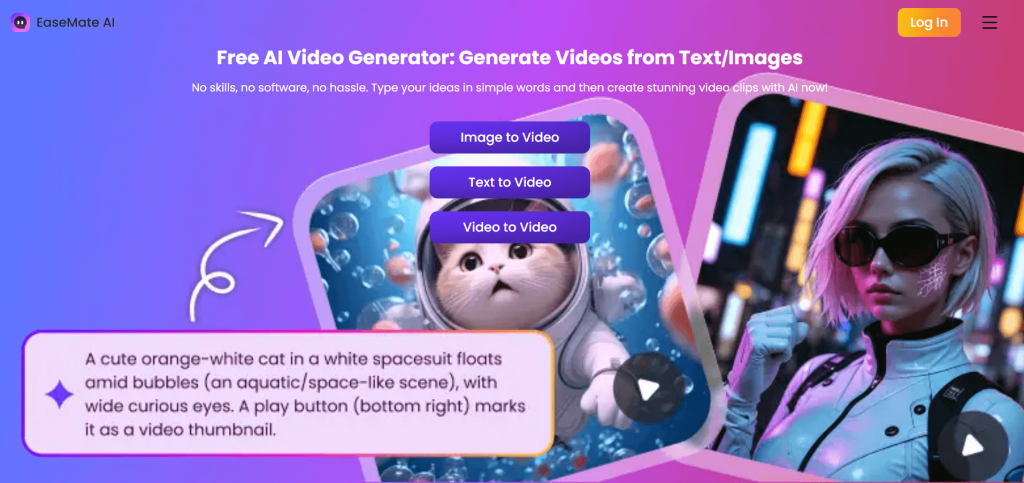
In essence, it is useful as a creative testing tool, but it should not necessarily be your main “uncensored” AI video solution.
Introduction: Restrictions in Mainstream AI Video Tools
AI video tools are becoming more capable, and they have found their place in marketing, education, and content creation. But most mainstream AI video tools are also becoming more controlled with strict boundaries in place, and these boundaries prioritize control, predictability, and compliance over open-ended creativity.
EaseMate AI is positioned as a flexible alternative offering more freedom, fewer limits, and access to multiple AI video models through a single interface. The key question, however, is whether it actually delivers on its uncensored video generation promise, or creates the impression of it, or simply approaches the same limitations differently.
Overview of EaseMate: What It Really Is and What It Offers
EaseMate AI is an all-in-one AI video generation tool where users access multiple AI models through a unified and streamlined interface (i.e., it brings together a wide range of video generation technologies and allows users to switch between them depending on their needs). Thanks to that, users can generate videos, test styles, and experiment with outputs from one dashboard.
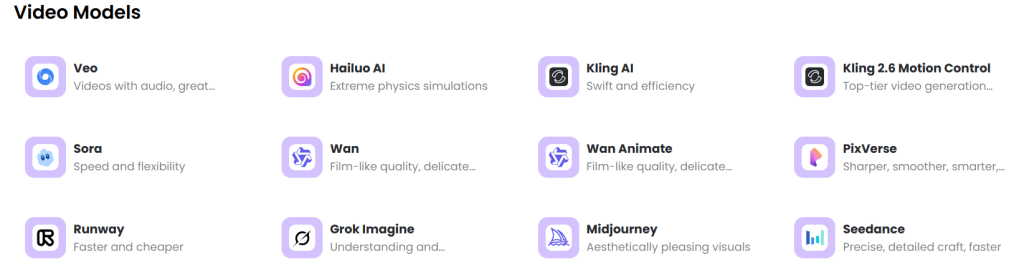
Moreover, its appeal lies in the notably large and diverse model ecosystem that it integrates from several well-known and emerging systems, including;
- Runway ML
- Veo 3, Veo 3 Fast, Veo 3.1)
- Seedance (Lite, Pro, 1.5 Pro, 2.0, and fast variants)
- Kling (Standard, Pro, Master, 1.6, 2.5 Turbo Pro, 3.0, and others)
- Wan (2.2 through 2.7 variants)
- Midjourney
- Hailuo (02 and 2.3 Standard/Pro versions)
- Pixverse V5
- Sora 2 and Sora 2 Pro
- Grok.
This breadth is one of EaseMate’s defining features. And because the tool is not limited to a single model’s strengths and weaknesses, creators get to experiment across multiple systems, each with its own style, motion handling, interpretation of prompts, and some may be more permissive than others.
With such a workflow, EaseMate serves as a more flexible or “uncensored” alternative. However, the drawback of relying on external models is having no full control (i.e., over output quality, consistency, and even content restrictions, which are influenced by whichever model is selected at the time). And this is exactly what puts its credibility and potential as an uncensored video generator into question.
Up to this point, we can surmise that EaseMate AI is comprehensive, flexible, and it also gives creators different ways to work around boundaries and restrictions.
Core Capabilities: What You Can Actually Do With EaseMate AI
At a functional level, EaseMate AI can handle two of the most common forms of AI video generation: turning text into video and turning images into animated clips. But it does it differently by providing multiple ways to achieve those results.
Users can generate videos using text-to-video prompts, where a written description (e.g., of scenery, an action, or an idea) is transformed into a video, or through image-to-video animation, where a static image is brought to life. These features may not be unique on their own, but the opportunity to run the same idea across different models and get noticeably different interpretations is peak!

This diversity is very relevant to creative freedom. More so, the quality of the results could also vary (e.g., in subtle motion effects or dynamic transformations) depending on the technology backing the model in use.
In addition, EaseMate also supports multiple aspect ratios and audio options, among other things. Users can utilize this feature and adapt their content to different platforms (e.g., vertical/portrait view for social media use or the widescreen/landscape seen in standard videos). More so, the ability to generate audio using basic sound elements can reduce the need for external tools when creating simple content.
Then, there is its watermark-free exports, which means the results/outputs it generates are suitable for real content creation and ready for publishing. Moreover, its relatively intuitive interface equally contributes to a workflow that is fluid even for users with little to no prior experience in AI video generation.
It goes without saying that the key capability of the tool is not any single feature, but its ability to switch between models when one approach doesn’t work.
In that sense, EaseMate’s optionality gives creators multiple paths to achieve a result, especially in situations where restrictions or limitations might otherwise block progress.
Hands-On Experience: Workflow, Interface, and Ease of Use
Using EaseMate AI first-hand, the experience is fun at the start, and it becomes more nuanced once you (users) move beyond the surface and begin generating actual videos.
The onboarding process is simple, and users get to choose their workspace — either the web-based tool or the EaseMate app, which can be installed on mobile devices.
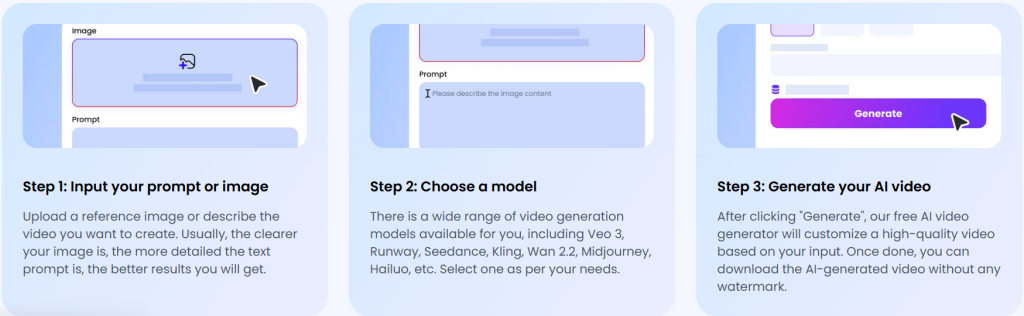
The workflow is all but a repeatable pattern of selecting a model, inputting a text prompt or uploading an image, adjusting basic settings like aspect ratio, and then generating the video — it’s that simple. In practice, if a result appears restricted, incomplete, or off-target, the natural response is to try a different model rather than rewriting the idea entirely — iteration workflow.
It is worth noting that choosing between models like Runway ML, Kling, or Veo variants is not a cosmetic decision, but it directly affects prompt interpretation, output quality, style, and whether the result will be usable. For new users, it is more of a trial-and-error rather than a guided experience.
The generation process itself is relatively fast, depending on the model selected. Moreover, the “fast” model variants produce results more quickly than the higher-quality models. But it only takes a minute and a few attempts to realize that speed alone does not define efficiency. So, users might need to tweak the prompt, switch models, or try all over at some point.
On the upside, EaseMate is easy to use. However, users don’t get fine-tuning/editing features or detailed customization options within the platform itself, which limits how much you can refine a result once it is generated.
Overall, EaseMate is easy to start and easy to use, but it is heavily dependent on experimentation because every user literally has to figure out what works and what doesn’t across different models.
Output Quality: Performance, Consistency, and Limitations
The output quality of EaseMate AI reflects its multi-model nature — capable at its best, but variable, and sometimes unpredictable/inconsistent across several generations.
In terms of prompt accuracy, simpler prompts always produce clear and usable results. More so, basic scenes (e.g., a person walking, a landscape shot, or a simple action) are often interpreted correctly and polished. However, as prompts become more detailed or complex, results might start to drift mainly because some models follow instructions more closely, while others simplify them and deviate from the original idea or request. This variation makes it difficult to expect a consistent standard across the tool.
Moreover, certain models (not all) can produce relatively smooth and natural movement in dynamic scenes and maintain coherence. However, visual realism varies with the model in use. Most times, the outputs may appear clean and visually appealing, but artifacts such as distortions, unnatural transitions, or flickering details are likely to appear occasionally. The artifacts’ issue is not constant, but it does show up; it might take a few attempts to fix them.
In addition, consistency is also a challenge. Because running the same prompt multiple times, even on the same model, can produce noticeably different results, thereby making it even harder to rely on a single generation. In short, it might take a few attempts before you (users) get the desired outcome.
The difference between models is perhaps the most defining aspect of output quality on EaseMate, and it reinforces the idea that the tool does not deliver a single standard of quality, but a range of possibilities depending on the model you choose.
Ultimately, EaseMate produces good results, just not consistently and usually not on the first try.
In any case, this makes it better suited to users who are willing to experiment and iterate than those expecting reliable, one-shot outputs.
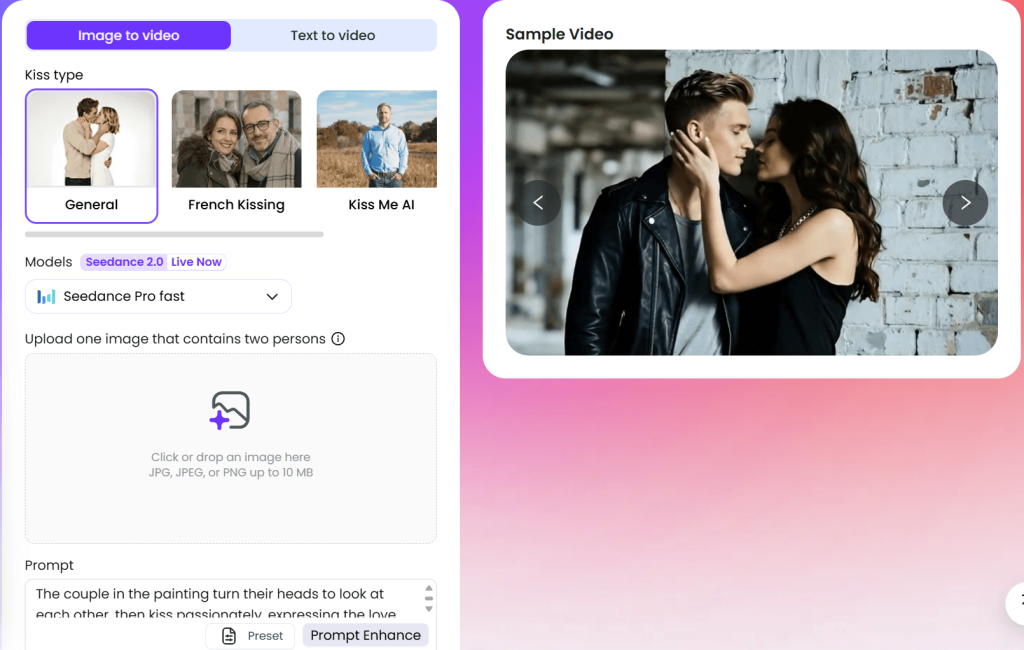
How “Uncensored” Is EaseMate AI in Practice?
EaseMate AI presents itself as a more open and flexible alternative to mainstream AI video generators. Moreover, its access to a wide range of models and fewer obvious guardrails in the interface gives the impression of it having little to no restriction. But to see if that impression adds up, one has to use it more deliberately and evaluate how it actually behaves under different types of themes and use cases.
In a truly uncensored system, the expectation of any new user is to enter their prompt (i.e., any prompt), have it interpreted just as they wrote it, and receive an output that reflects their intent without any kind of interference. There should be absolutely no silent filtering and no outright refusals based on content type.
A good look at this, and one would realize that this is not how EaseMate really works.
More so, one thing becomes glaring when enthusiasts and creators test a range of prompts on EaseMate (i.e., from simple prompts to neutral ideas to more specific or boundary-pushing requests). Some prompts go through cleanly and produce results that are aligned with the input, some come out overly simplified or slightly altered, and for some, the result deviates from the original intent altogether.
Frankly, this is the core dynamic that defines the EaseMate experience.
In addition, EaseMate integrates multiple systems such as Runway ML, Kling, Veo variants, and others, and they contribute a lot to its flexibility. However, the generator automatically inherits their differences as well —including how they handle sensitive or complex prompts. Therefore, EaseMate merely acts as a layer that gives users (you) access to these models. It does not control them.
So rather than removing restrictions, the tool spreads them across different models.
This creates a kind of flexibility that can be interpreted as “uncensored,” especially when compared to tightly controlled tools. If one model limits a prompt, creators can try another. And if the result is not accurate, you can always iterate until something works.
But, to be clear about what is really happening.
EaseMate is not exactly operating without rules. It is a creative environment that is made up of multiple models, each with its own rules. Therefore, what EaseMate’s system (i.e., the moderator of the models) is really doing is, attempting to find a path that offers the least resistance between those models/systems.
This distinction becomes even more noticeable when consistency is taken into account because even when a prompt is accepted, the output is not always predictable. For instance, two attempts, each with the same input, can produce different results (i.e., in quality and in interpretation/presentation of the intent). By implication, it becomes very difficult to rely on the tool (EaseMate) for precise or repeatable outcomes, especially not for complex or sensitive concepts. In that sense, the limitation is not just about restriction but also about control.
Taken together, the generator sits in a middle ground because it is clearly more flexible than enterprise-focused tools that enforce strict boundaries, but it does not meet the standard of a fully uncensored generator.
The freedom it offers is real, but it is achieved through experimentation and “working around limitations,” not exactly because it is devoid of restrictions.
Therefore, whether that is enough depends entirely on what you, as a user, expect from an “uncensored” AI video tool.
Ideal Use Cases of EaseMate AI
EaseMate AI performs well in a few specific scenarios where convenience and flexibility matter more than precision or consistency.
Its all-in-one AI video generation feature makes it a practical choice for experimentation. Thanks to that, enthusiasts who have always been curious about the individual models, how they perform, the themes or styles they excel in, as well as their technical boundaries, can experiment all they want. They can also use it to explore diverse creative directions, refine ideas, or compare how differently the models handle similar prompts —something you simply can’t do on single-model platforms.
More so, its flexibility and speed make it well-suited for early-stage content ideation and content generation. Therefore, it can be used to produce clips for social media or to generate rough concepts.
In addition, it saves users who are new to AI video tools the hassle of navigating multiple tools, it lowers the barrier, it centralizes access, and makes it easier to get started.
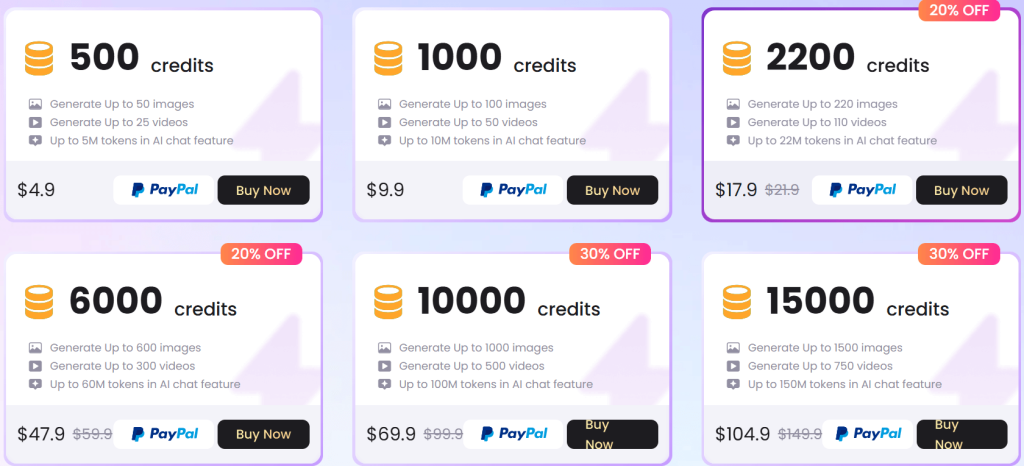
Pricing, Credits, and the Real Cost of Use
EaseMate AI uses a credit-based system.
Every new user who onboards using the EaseMate app receives 30 credits as a bonus, and the bonus credits can be used to explore the generator.
The credits are deducted for every generation attempt. However, the rate depends on the model in use and the complexity of the task (e.g., text prompt generation or image-to-video animation). Moreover, actions such as model switch, prompt adjustments, or retries all count as attempts, so they equally consume credits.
Basically, users can either use the cheaper and faster models and get simple outputs, or spend more credits on higher-end models and retries for better quality. It all comes down to choice and cost.
EaseMate’s pricing system is such that the true cost is not defined by how many videos you create, but by how many times you need to try before getting something usable. And since the results may not always be perfect on the first try, multiple attempts will add up, costing more credit.
Real User Feedback and Market Reputation
Looking beyond features and firsthand testing, EaseMate AI is broadly perceived as a decent AI video exploration tool. And like every other AI tool, it has its flaws, yet it excels in certain areas.
The feedback from users across the early reviews and discussions confirmed that creators are clearly interested in what the generator (EaseMate) is trying to do with its multi-model approach and the idea of fewer restrictions compared to more controlled AI tools. Although their interest is often met with reasonable concerns about its performance during use.
First off, users gaining access to multiple widely-known and developing AI models through one interface is something of a convenience. It totally eliminates the need to set up separate accounts or workflows just to test the individual capabilities of the models. Moreover, creators who like to try new angles, test unusual themes, or compare outputs across systems encounter less friction while they are at it.
In addition, the freedom and flexibility it offers and its ability to generate content that mainstream AI video generators would never permit, was a talking point. This quietly reinforces its position as a more open option than tools focused on enterprises and corporate use.
However, the main concern with EaseMate is the quality of results, and its inconsistency across several generations. To the point where some users concluded that it can be relied on for experimentation and casual use only.
Moreover, there were complaints about credit efficiency and how the system charges per generation attempt. For most, they have to attempt a few times and try out different variants before they can get a usable result. What this does indirectly is create a notion that cost is not proportional to value on EaseMate.
All of these confirm that EaseMate is widely seen as an interesting but still maturing platform. It offers a compelling concept (i.e., bringing multiple AI video models into one place with fewer visible restrictions), but the execution is not yet as refined or reliable as more established tools.
Is EaseMate’s Uncensored Video Generator Actually Worth Using?
At the center of this review are questions of whether EaseMate AI truly delivers as an uncensored AI video generator, and whether it is worth using because of that.
Frankly, the answer lies somewhere in the middle.
EaseMate does offer more flexibility than most mainstream AI video generators. Giving users access to multiple models (each with its own moderation style) creates the impression of fewer restrictions. In real use, this means you can sometimes generate content that would be blocked outright on more tightly controlled platforms. That alone gives it an edge over mainstream tools.
However, it is presumptuous to compare that level of flexibility with full freedom. In that sense, EaseMate is a more or less a bottom-tier uncensored generator with a workflow that works around underlying restrictions. Some of its models are stricter than others, so certain prompts might still be quietly modified or rejected, and results may vary even when using the same input. This is very unlikely with fully uncensored and unrestricted generators. Basically, EaseMate is not entirely unrestricted, but it spreads the underlying guardrails across different systems, providing an open, creative environment.
To the question of whether it is worth using, EaseMate can be genuinely useful and also worth using if your goal is to experiment, test boundaries, and explore different outputs. It makes it possible for creators to try things, switch approaches, and occasionally achieve results that other restrictive platforms wouldn’t allow.
But if your expectation is that of a tool that will be consistently reliable, fully unrestricted, and cost-efficient, it falls short.
Final Verdict
In the end, EaseMate AI is more or less a gateway to a wider AI ecosystem — it gives creators access to multiple video models, different generation styles, and a level of flexibility that most single-platform tools do not offer. That alone makes it interesting enough for users who like to experiment, compare outputs, or push beyond the limits of more controlled systems.
However, the idea of it being “uncensored” doesn’t fully hold up under closer use, and that does not make it a bad tool. It just defines what it actually is.
EaseMate is best approached as a creative testing ground. With that, it can deliver moments of real value.