
In the world of AI generation tools, there are a few terms that draw attention (hook) as much as “free” and “uncensored.” These terms suggest instant and easy access, and equally hint at fewer limitations and more room to experiment without constantly working around restrictions — a workflow with no upfront paywall, no strict filters that block prompts, and requires no setup.
Tired of Expensive Magi Alternatives
More Control, Faster Output, And Fewer Creative Limits.
Try Now
However, the question of whether Magi AI’s labels on openness and flexibility truly translate into a better experience for users, or if they are just marketing hooks, is worth a closer look.
Magi AI’s Image to Video Generator: An Objective Look
Magi AI’s image-to-video generator, also known as Magi1.ai, presents itself as a simple, accessible tool that is built for turning still images into short videos with minimal effort. The idea is straightforward, whereby users upload an image, describe the kind of motion or scene they want, and the system generates a video clip based on that input.
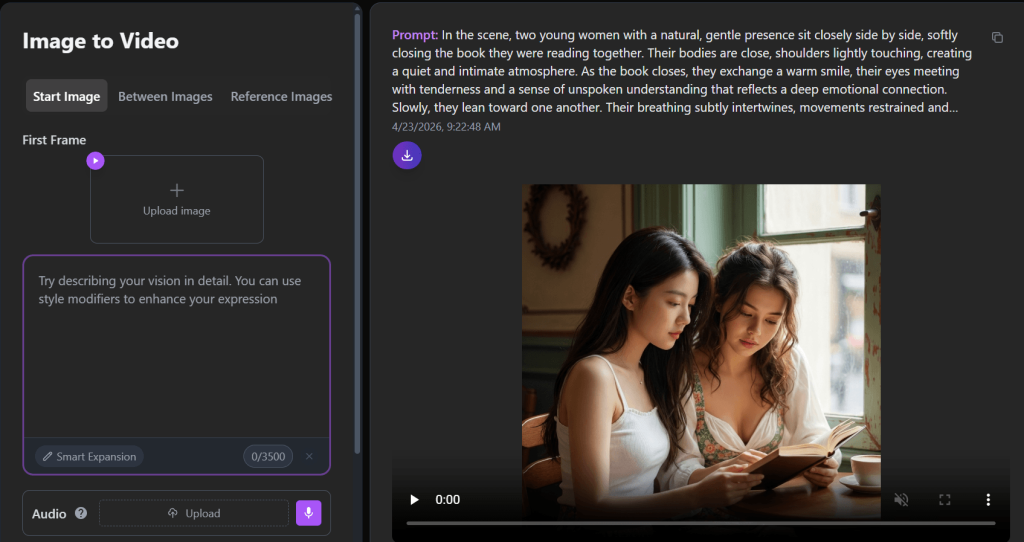
From the outside, it looks surprisingly flexible, because users are not limited to just a single image input—there are options for start images, transitions between multiple images, and even reference images to guide the output. That alone suggests a level of control that goes beyond basic image animation tools. Add to that settings like duration, resolution, aspect ratio, and even seed control, and it gives the impression of a system that’s trying to blend simplicity with a bit of creative depth.
There are also a few features that hint at more advanced use cases. For example, its ability to include audio with a starting image or guide outputs using multiple references makes it possible for creators to experiment with storytelling or more structured visual sequences, not just quick animations. At the same time, labels like “free” and “uncensored” create an expectation that users can explore ideas more freely than they might on more restricted tools.
So from a distance, Magi AI appears to be a tool that’s easy to get into but still offers room to experiment. Whether it actually delivers in terms of performance, result, and overall experience becomes clearer once users move past the interface.
First Contact: Interface Simplicity vs. System Depth
The first thing to be noticed when using Magi AI’s image-to-video generator is how much is happening on a single screen, yet the interface is not overly complex, somehow. The layout is clean, the options are clearly grouped, and nothing immediately suggests that users will be dealing with a sophisticated system. For most users, especially those trying it out for the first time, it comes across as straightforward and easy to navigate.
Furthermore, the generator has three distinct modes/input sections: Start Image, Between Images, and Reference Images. The modes are found within the same interface, but each section has its own controls and settings.
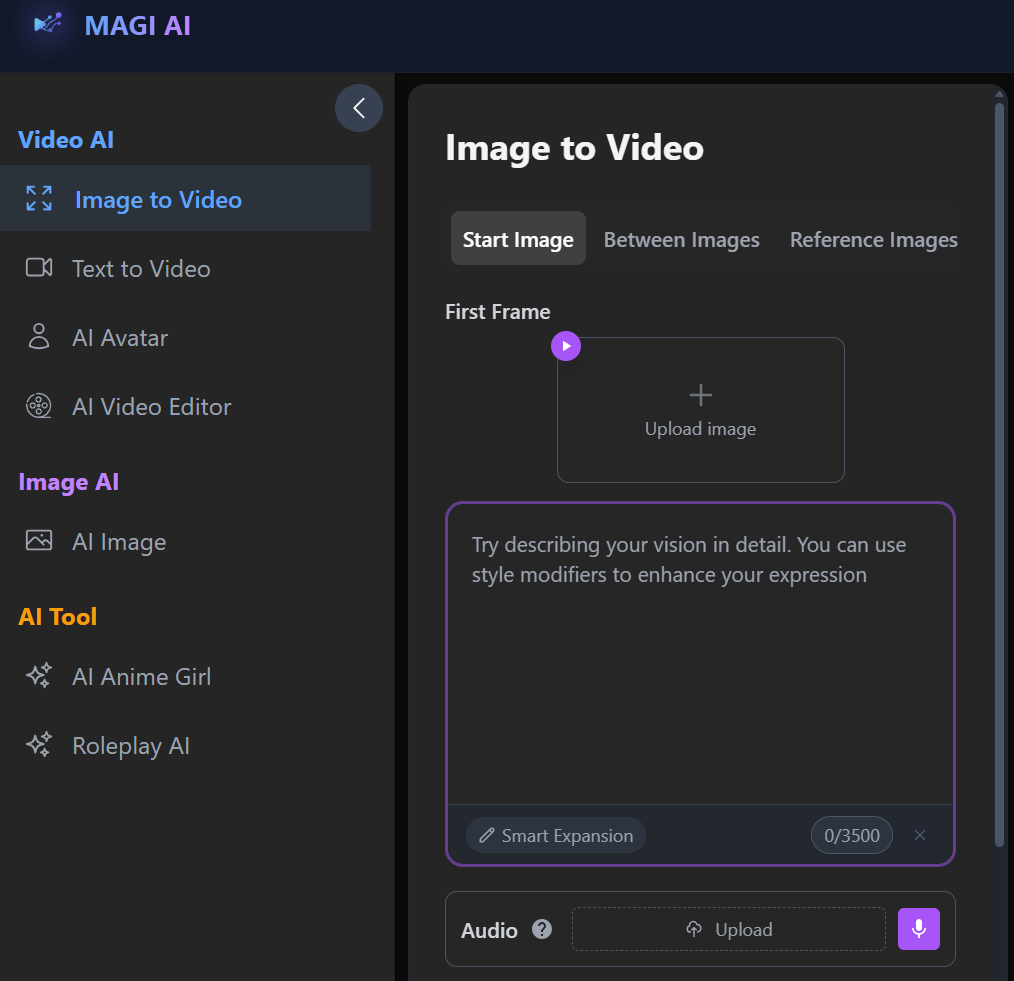
The Start Image mode is the most direct. Users simply upload a single image, add a prompt, and generate a video from that base. It is the entry point, and it reinforces the idea that the tool is quick and easy to use.
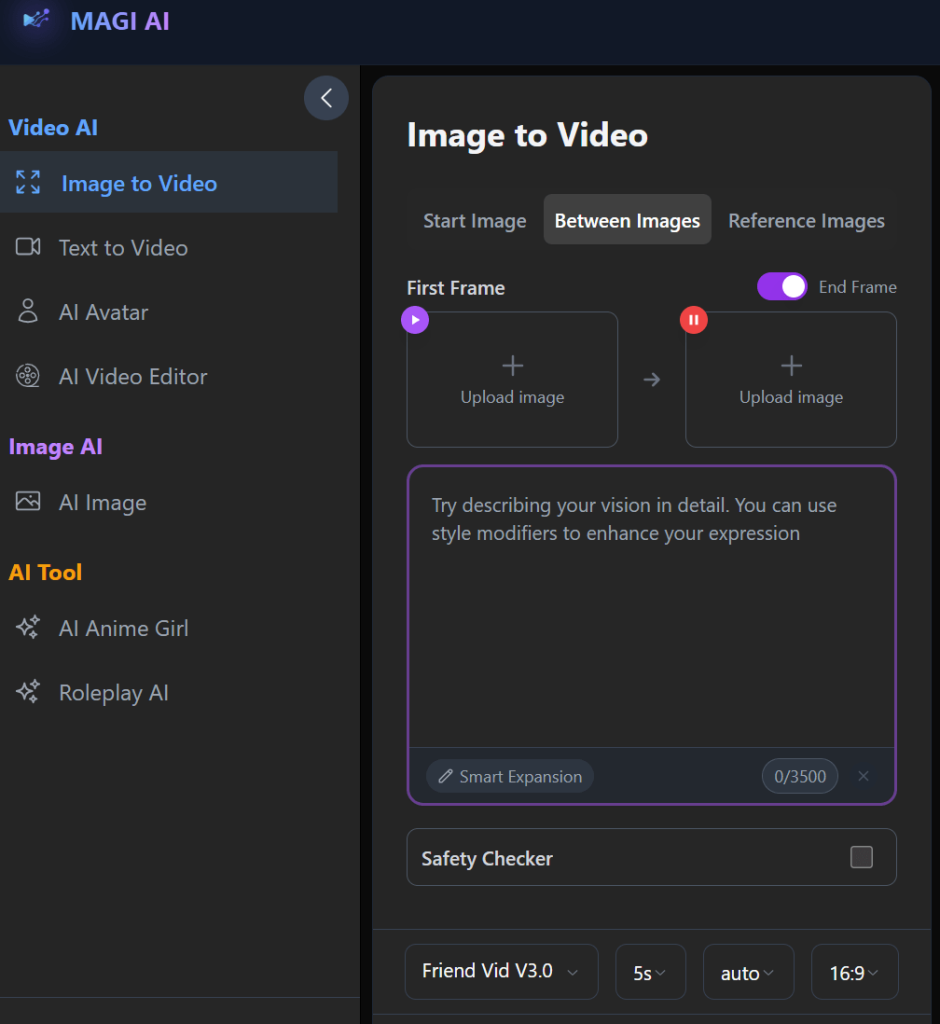
The Between Images mode or section introduces a different concept that attempts to create a transition between two images, instead of animating one image. This might come off as a small extension of the core feature, but in practice, how the system interprets motion and continuity is a lot different here.
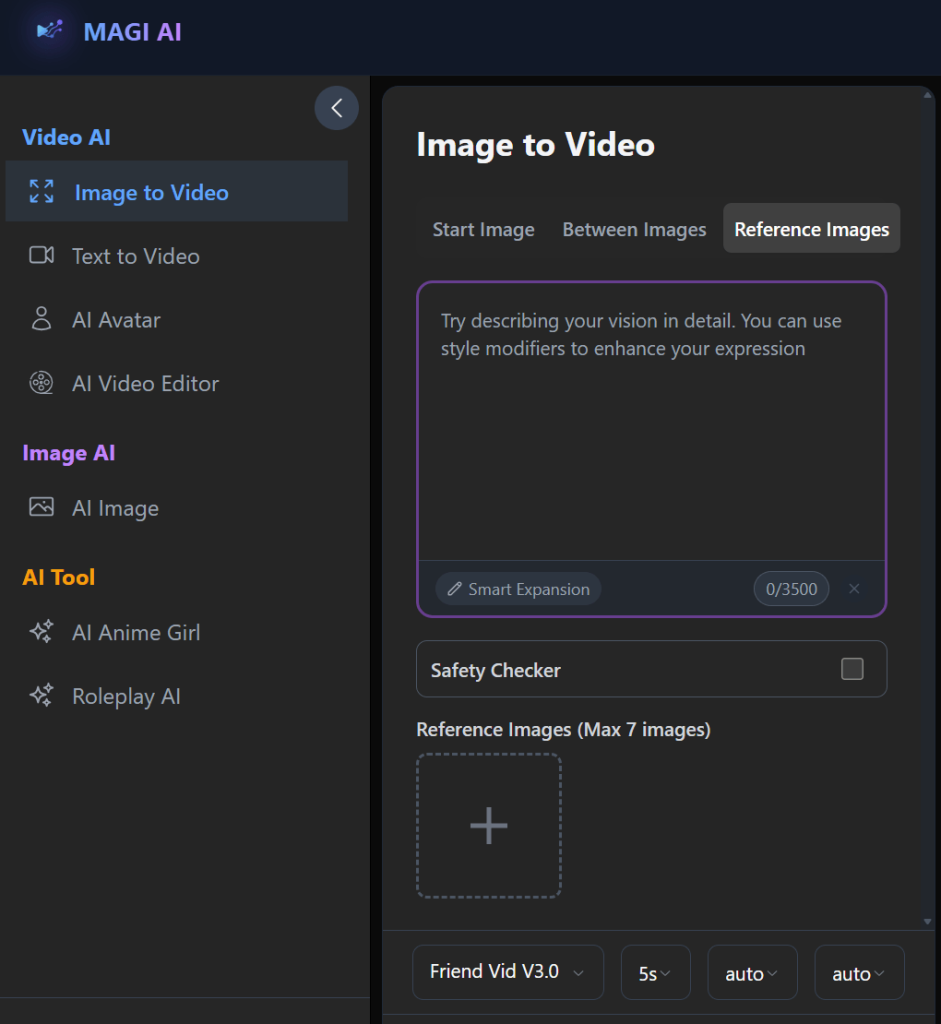
Then there’s the Reference Images mode, which allows users to guide the output using multiple images. This allows for a modicum of control, especially for creators who want more influence over the final result. However, it also introduces more variables, which can make outcomes less predictable.
For each of the modes or input sections, users are being asked, even if indirectly, to make choices about how the video should behave (i.e., how long it should be, what resolution to use, what format fits their need, and in some cases, how consistent the output should be through seed selection). All these give the impression that the generator might be able to handle more than just simple animations and possibly account for continuity, style consistency, and even narrative flow across frames.
What stands out here is not just the presence of these modes and input sections but how they are presented, because the interface stays approachable, even though the underlying system is more nuanced than it initially appears.
More importantly, users can decide to keep things simple (i.e., upload a single image, leave most settings on default, and generate a clip). But the additional controls are always there if they want to go deeper. That balance allows both beginners and more experienced users to use the same tool in different ways.
Overall, the first interaction gives an impression that Magi1.ai is trying to offer a bit more flexibility and structure, offering multiple ways to generate video—each with its own behaviour, strengths, and limitations.
How the Generator Was Evaluated in Real Use
Magi AI’s image-to-video generator was tested in practical, repeatable scenarios that reflect how real users and creators would approach it. Basically, by trying different inputs, adjusting settings, and paying attention to how consistent the results are over time, the extent of its capabilities, as well as its drawbacks, was determined.
Moreover, it was not treated as a one-click generator, but by how it behaves under different conditions, especially when the expectations change.
· Single Image Animation vs Multi-Image Transitions
This layer of testing focused on how the generator handles its core use cases. With a single image in the Start Image mode, the goal was to see how well the system could introduce motion without distorting the original subject. In most cases, the tool produced usable short clips, especially when the prompt was simple and the image was clear.
When moving to Between Images and Reference Images, the behaviour became less predictable. Transitions between two images worked in principle, but the consistency was dependent on how similar or different the images were. With multiple reference images, the system sometimes blended the elements well, but other times it was unable to maintain a clear visual direction.
· Prompt Responsiveness Across Modes
Prompts were tested in both simple and more detailed forms to see how much influence they actually have. In practice, the prompts acted more like guidance than strict instructions. Therefore, simple prompts produce more stable results, while more detailed prompts might not always lead to more accurate outputs.
In addition, prompt responsiveness also changes across different modes.
· Motion Realism and Stability
Subtle movements such as slight head turns, camera zooms, or ambient effects generally came out better than complex actions. Suggesting that the generator is more reliable when working within controlled or low-complexity scenarios.
· Impact of Duration, Resolution, and Seed Control
Duration and resolution adjustability helped to reveal how the system scales. The result of this evaluation proved that when shorter clips were generated, they are usually more stable, whereas longer durations sometimes introduced artifacts or drift in the animation. More so, increasing the resolution improved visual clarity slightly, but it did not necessarily fix the underlying motion issues.
Seed control also added an interesting layer. Using the same seed could produce somewhat similar outputs, but not always identical ones. This means there is some level of repeatability, but not necessarily a guarantee of exact results.
· Output Consistency Across Repeated Runs
Finally, the same inputs were tested multiple times to measure consistency. And it became clear that results can vary noticeably even when nothing changes.
Sometimes this works in your (the user’s) favour, giving you alternative variations to choose from. Other times, it means you have to run multiple generations just to get one usable output.
Taken together, these tests show that Magi AI is not a strictly controlled system. It is more flexible and exploratory in how it generates results.
Three Generation Modes, Three Different Working Processes
The working processes of Magi1.ai differ from those of a single, unified system. Its three-generation modes may sit side by side in the interface, but they produce very different results in practice.
This distinction is crucial, as the experience depends heavily on which mode the user is working in.
1. Start Image (Single Input Animation)
This is the most straightforward and, in many cases, the most reliable mode.
Users get to upload a single image and guide the motion with a prompt. In real use, this mode produces the most stable outputs, particularly when the image is clear and the prompt is simple.
However, if users push beyond simple motion and into asking for complex actions or dramatic transformations, the system begins to falter and show its limitations (e.g., in the form of distortions, inconsistent movement, or misinterpretation of the prompt and the creator’s intent).
Even so, this remains the most usable part of the generator for short animations.
2. Between Images (Transition Generation)
This mode revolves around the idea of transforming one image into another over time. On paper, it is a compelling feature, brilliant even, especially for creators who want to simulate transitions or visual storytelling between two frames.
In practice, however, when the two images are visually similar, the generator can create smooth and somewhat convincing transitions. But when the images differ significantly (e.g., in subject, composition, or style), the transition may come off as abrupt, overly artificial, or visually unstable. The output? Incoherent.
So while the concept is strong, the execution depends heavily on how well the inputs align.
3. Reference Images (Guided Generation)
This is where the generator attempts to offer more control by allowing multiple reference images to influence the output.
More so, it opens up more possibilities for creators to guide the style, composition, or elements of the final video by providing several visual cues. This should lead to more intentional and refined results — in theory. Although it is a bit more challenging in practice, because the more inputs you provide, the more the system has to interpret and balance. Sometimes it blends the elements creatively, but not always.
This makes the mode powerful, but also less predictable compared to the simpler Start Image approach.
Across all three modes, it is glaring that Magi AI is not a one-size-fits-all generator.
Motion Generation: Controlled Output or Guided Guessing?
At the core of Magi AI’s image-to-video generator is how it handles motion. This is also where the tool reveals both its strengths and its limits.
Some might be under the assumption that they control the motion directly through prompts simply because they provide the starting material, describe what should happen in a text prompt (i.e., camera movement, subject motion, environmental effects), and the system generates a video based on that input. But in practice, the process is more like guided interpretation than it is precise user control.
In short, the tool does not execute motion in a precise, step-by-step way. Instead, it interprets your input and tries to produce something that fits within what it understands as plausible movement.
When users work with simple ideas/motions such as a slight camera zoom, a gentle head turn, or soft background effects, the results are often convincing enough. With this, the motion will be smooth, and the subject will remain relatively stable across frames. These are the situations where the system performs best, and where creators are most likely to get usable outputs without much effort.
Actions that involve multiple moving parts, changes in perspective, or precise timing tend to produce less consistent results, and users may notice parts of the image warping slightly, motion that does not follow the prompt, or elements appearing and disappearing randomly between the frames.
From a technical viewpoint, it is not that the system completely ignores the complex request; it just fills in the gaps in a superficially fair but not always consistent way. Moreover, the system generates motion based on patterns it has learned, which means it can approximate certain types of movement better than others.
So the answer/experience sits somewhere in between.
You, as a user, do have influence over the outcome. Your image choice, your prompt, and your settings all matter. But they do not translate into exact control over the motion itself. Instead, they guide the system toward a result that may or may not fully match your expectations/align with what you had in mind.
Ultimately, users get enough control to influence the outcome, but not enough to fully determine it.
Prompt Influence and the Limits of Control
At a basic level, prompts do matter because they help shape the direction of the output, influence the type of motion, and add context to what the system should generate. But in real use, prompts act more like suggestions than precise instructions.
When users keep prompts simple, the system responds better because there is less ambiguity to interpret.
Some might expect that adding more description would lead to better accuracy, but that’s not consistently the case. From firsthand use, the system does not fully follow complex instructions. What it does is: pick up on certain elements and ignore the others. So, the results thereafter only partially reflect what was requested.
In addition, the generator clearly prioritizes visual data. So, if there is a mismatch between what the prompt describes and what the image shows, the image usually takes precedence.
Another effect is variability. When the same prompt is paired with similar images across many generations, their outputs are rarely identical.
So while prompts are an important part of the process, their influence is limited within Magi AI.
Advanced Controls Without Complexity Overload
Additional settings are arguably one of the interesting aspects of Magi AI. Because they give users more influence over the output.
What stood out during the test was that these controls are present, yes. But they are not forced on users. Users can leave the settings as they are and still generate good videos; however, the settings can be adjusted to fine-tune the overall experience.
For instance, the duration. Users can choose to generate short clips or slightly longer ones (i.e., ranging from a few seconds up to around 15 seconds) depending on the mode.
Then there’s resolution. The option between standard and higher resolution (e.g., 720p and 1080p) does improve clarity to a degree. But it’s imperative to know that resolution does not fix underlying issues. If the motion or structure isn’t stable, higher resolution only makes those flaws more noticeable.
Seed control introduces another layer. For creators, this suggests the possibility of repeatability (i.e., using the same seed to reproduce similar results). From a first-hand use, however, it offers partial consistency, but not exact replication. You may get outputs that are related, but not identical.
Aspect ratio and framing are more straightforward. Users get to shape how the final video fits different formats— for social media or specific display needs. These settings generally behave as expected, so they don’t introduce much unpredictability.
There’s also the option to include audio input, particularly in the Start Image mode. Although its practical impact is still limited. This is proof that Magi1.ai is experimenting with additional layers of input.
Overall, these controls add depth without including complications. Users can stay at a surface level and still get results, while creators can explore the settings to push the system further.
Even so, adjusting these settings can influence the outcome, but the system still interprets inputs in its own way, which means experimentation is part of the process.
The “Uncensored” Claim: Input Freedom vs Output Reality
Magi AI positions its image to video generator as “uncensored,” which immediately sets a certain expectation for users: there will be fewer restrictions, more freedom in what you can input, and less interference from content filters.
At the input level, that expectation largely holds up.
Users can enter a wide range of prompts without being outright blocked. Moreover, the presence of a safety checker in the interface does indicate that some level of moderation exists, not overly aggressive as on more restrictive tools.
However, input freedom is only one part of the equation.
What matters just as much is how the system handles those inputs when generating outputs. Because even when a prompt is accepted, it could be loosely interpreted, leaving the output to derail from the intent behind it due to the generator’s internal limitations.
This creates a kind of gap or distinction between what is allowed and what is actually achievable.
Therefore, the “uncensored” label reflects a more permissive input system rather than a fully unrestricted generation engine.
You’re given more room to explore, but the system’s boundaries show up in the output rather than at the input stage.
Output Quality and Consistency Across Modes
The experience on Magi1.ai depends heavily on how you use the tool, the mode you’re working in, and how complex your inputs are.
At its best, the tool produces short clips that are visually engaging, usable, and good enough for casual sharing or quick creative use.
But across different modes, the quality can shift quite a bit. The Start Image mode generally produces the most stable and visually coherent results because the system does not have to manage too many variables at once.
The quality of the Between Images mode is dependent on the alignment of the two images. When they are similar, transitions can look smooth and intentional. When they are not, the output will be less refined.
Reference Images introduce even more variability and also offer more control in theory. However, the system sometimes struggles to balance multiple visual inputs.
As for consistency, there is no guarantee that running the same input multiple times will produce exact results. More so, the variations might differ in motion, structure, or overall feel, which can be considered an advantage when testing ideas. But for creators trying to achieve a specific outcome, it means generating multiple versions before finding something usable.
Visual stability is also something to pay attention to. In simpler outputs, details tend to hold up reasonably well across frames. But we can say the same for complex motion or longer duration.
Ultimately, Magi AI can produce good-looking results under the right conditions, but those conditions matter.
So, the quality is not fixed. It is conditional.
Speed, Free Access, and the Real Cost of “Free”
Magi AI promises free access, and that accessibility holds up at a surface level.
There is no immediate barrier to entry, which makes it easy to onboard, test ideas, see what the generator can do, and generate videos without an upfront paywall.
As for speed, the process itself is relatively quick. Most processes only take a moment, and some take longer, depending on the selected duration and settings. Therefore, this turnaround is fast enough for simple tasks (e.g., experimentation and idea exploration).
However, the main concern is not just access, but efficiency.
Because outputs can vary in quality and consistency, it is common for users to run multiple generations to get specific results. One attempt might look promising but have small issues. Another might miss the intent entirely.
The real cost, however, starts to show—not in money, but in time and effort.
In addition, there are practical constraints on how many outputs can be generated within a given timeframe. And these can be tied to queue behaviour, usage caps, or performance slowdowns during peak times.
So while Magi AI does offer real free access, it’s not entirely without cost.
Where MAGI AI Fits: Its Practical Use Cases
With Magi AI, users looking to create quick animations from static images can use a single image to produce short video clips for simple social content or visual experiments.
Creators can also use it for concept testing. They can use it to explore how a scene might move, how a character could animate, or how two visuals might transition. The tool provides a fast way to generate rough versions, so it’s not about getting a perfect result on the first try, but about seeing many different possibilities and directions within a short period.
It also works reasonably well for stylized outputs where the goal is to produce abstract, artistic, or visually expressive content. In some cases, the system’s unpredictability even adds to the creative process by producing variations that you might not have planned.
But outside of these scenarios, and into complex storytelling and workflows that require repeatability, Magi1.ai has a few drawbacks and cannot handle such workflows in its current state.
So where does that leave Magi AI?
It fits best as a lightweight, flexible tool for quick visual generation and experimentation. And its limitations become part of the experience for more demanding creative work.
Marketing vs. Reality: A Tool Defined by Trade-offs
Magi AI’s image-to-video generator is easy to understand when you look at it through its positioning. It’s presented as free, flexible, and uncensored—a tool that removes many of the usual barriers and lets users and creators generate videos quickly from images.
And it does deliver on parts of that promise.
The tool is accessible. It offers multiple modes, useful controls, and enough flexibility to experiment with different types of visual outputs.
But those advantages come with trade-offs that will be noticed in time.
The “free” aspect lowers the barrier to entry, but it doesn’t guarantee efficiency, which indirectly shifts the cost from money to time and effort.
The “uncensored” positioning allows more freedom at the input level, but that freedom doesn’t always translate into accurate or usable outputs.
Then there’s control (e.g., different modes, adjustable settings, and ways to guide the output). But the more you try to push the system, the more its internal limitations surface.
So rather than being defined by a single strength or weakness, Magi AI sits in a balance.
It is fast, flexible, and easy to access. At the same time, it is inconsistent, interpretive, and sometimes unpredictable.