
“No restrictions” is often considered the ultimate advantage in AI image-to-video generation because it suggests creative freedom (i.e., no blocked prompts, no limitations on creativity, and full control over how the video turns out). However, even the most powerful, unrestricted generators can only work with what you give them — input images.
If the input image is weak, unclear, or poorly structured, the output will be too.
Moreover, image-to-video models infer motion/movement from the visual information already present in the image. They look for cues like posture, lighting, depth, and texture to decide what elements should move, and how they should move. However, if the image does not clearly communicate structure and motion potential, the results will always be unpredictable and distorted.
This guide teaches how to choose, evaluate, and prepare quality source images that will produce smoother motion, better consistency, and more reliable results.
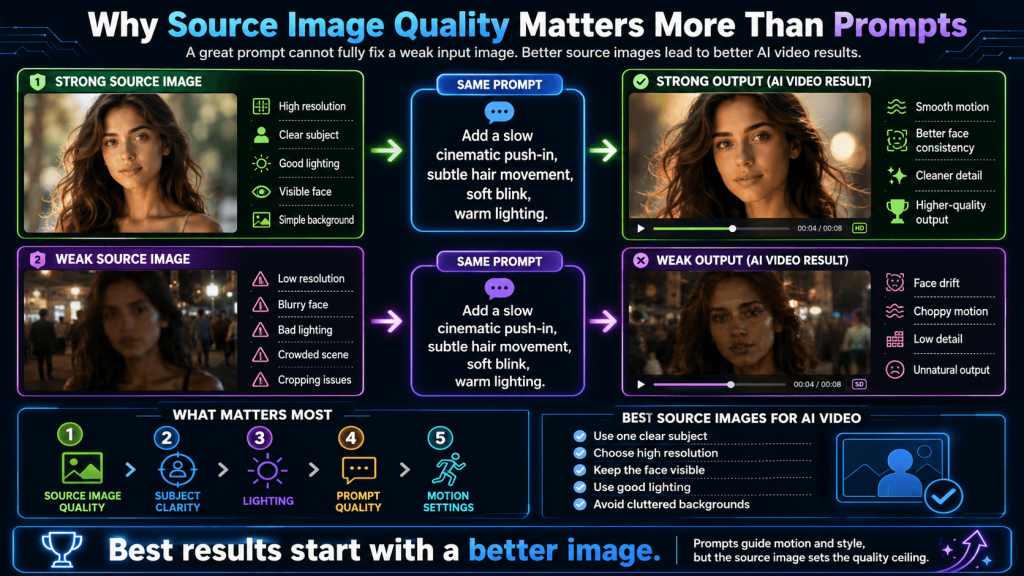
Why Source Image Quality Matters More Than Prompts
Prompts play an important role in AI image-to-video generation; however, they are not the foundation of the output — the image is.
Image-to-video models work by analyzing the visual information inside a single frame and then predicting how that scene might evolve. They simulate motion based on visible/obvious elements like body posture, lighting direction, depth, texture, and spatial relationships. These elements act as signals that tell the model what is likely to move and how different parts of the scene relate to each other.
However, when the information in the source image is insufficient (e.g., the image lacks clarity, the subject is ambiguous, the lighting is inconsistent, or the composition is cluttered), many things can go wrong. From random or exaggerated movement to distortion to identity drift to flickering details to inconsistent styling.
More so, creators can perfectly describe a motion, specify camera behaviour, and define style clearly, but if the image does not support those instructions, the model will either ignore parts of the prompt or interpret them loosely.
In contrast, a strong image can carry a mediocre prompt surprisingly far. When the subject is clear, the composition is clean, and the scene already suggests motion, the AI will produce a convincing result with fewer instructions.
Overall, prompts guide the motion, but images define what is possible.
For a more reliable AI video generation experience, it is smarter to start with better and intentional source images than with complex prompts.
What Makes an Image “Motion-Ready” for AI Video
Not all images are equally suited for animation. Some naturally translate into smooth, believable motion, and others produce unstable or awkward results, no matter how good the prompt is. A “motion-ready” image, however, already contains the visual structure and cues that an AI model can use to generate coherent movement.
At the core of a motion-ready image is clarity of subject. The AI needs to understand what the focal point is, as well as the elements and the boundaries between the foreground and the background. Therefore, a clean and well-defined subject eliminates confusion and gives the system a clear anchor to a controlled and intentional animation.
Similarly, the presence of natural motion cues within the image (e.g., flowing hair, slightly angled body posture, fabric caught mid-drift, or environmental elements like wind, water, or light rays) also provides directional signals that the system can use to simulate a more grounded and believable movement.
In addition, images that clearly distinguish foreground, subject, and background give the AI image-to-video generator a sense of spatial hierarchy (depth and detail). This allows for more controlled animation, whereby there can be a subtle background movement while the subject stands still, or vice versa. However, when there is no depth, as in flat or overly compressed images, the generator will treat everything as a single layer, and the animation will be warped, unsynchronized, and unrealistic.
Not only that, but image clarity and detail are equally relevant. Therefore, high-resolution images with sharp features and clear information are usually preferred over blurry/noisy images that may result in morphed faces, unstable edges, or loss of identity.
With these, no restriction AI image-to-video generators can function at their potential/capability to produce smooth, controlled, and realistic videos.
Best Types of Images for AI Image-to-Video Generation
Many images can be used for AI image-to-video generation; however, only a subset can consistently produce smooth, stable, and believable animation.
1. Portrait Images
A portrait image offers multiple anchor points for animation. For example, the portrait of a subject whose face is slightly turned, has a gentle expression, in a relaxed posture, with visible eyes, a defined facial structure, and other elements like hair or clothing, offers clarity.
2. Stylized and Anime Images
Clean, stylized, and anime images also produce remarkable results. Although it depends on clear linework, well-defined shapes, and a readable pose. Therefore, if the composition is too complex or overly decorative, the output may be inconsistent. The best stylized/anime images, however, are those that simplify the scene and preserve direction and character identity.
3. Product and Object Images
Isolated and unambiguous images are ideal for making AI-generated product videos. Moreover, a product or object image with a simple background and clear lighting can be easily transformed into an AI video (i.e., by adding motion, camera direction, lighting, and environmental effects).
4. Environmental Scenery
Scenes that include environmental elements are also highly effective. More so, landscapes with flowing water, drifting clouds, moving light, or wind interaction are all examples of natural motion cues that the generator can expand upon for direction and continuity. However, clarity is still crucial because overly busy environments reduce control and introduce randomness.
Across all these categories, it is glaring that the best images are not the most complex or visually dense; they are the most readable. They present a clear subject, a coherent structure, and subtle hints of motion that the AI image-to-video generator can follow.
When an image is easy to interpret, it is easier to animate. And when it’s easier to animate, the results will be more stable, more natural, and far more aligned with the creator’s intent.
Images That Usually Fail (and Why)
In AI image-to-video generation, when an image has too many competing elements (i.e., multiple people, objects, or focal points), the system usually finds it difficult to determine what should be prioritized, and this results in chaotic movement, identity inconsistencies, or disconnected scenes.
Similarly, when the environment is filled with excessive detail, textures, or overlapping elements, it is hard to distinguish what belongs to the subject and what belongs to the background. By implication, the motion may “bleed” into unintended areas, and the overall aesthetics may be dissatisfying.
In addition, another failure point is when the subjects are incomplete (e.g., when key features like faces, hands, or limbs are partially cut off). AI models depend heavily on complete structural information to maintain consistency across frames. So, when parts of the subject are missing, the model will attempt to reconstruct or guess them during motion, and this can lead to distortion, flickering, or unnatural transformations.
Without cues like body angle, environmental interaction, or layered composition, the AI has no guidance on how the scene should evolve — except prompts. In these cases, the generator might add random or impossible movement.
Low-quality images/visuals are another consistent source of failure because blurry, low-resolution, or artifact-heavy images lack the detail needed to preserve structure in an AI image-to-video generation workflow. Even if the overall composition is good, the image’s insufficient clarity makes it difficult for the generator to maintain coherence throughout the animation.
Taken together, image failure in this workflow is because of uncertainty. When the AI cannot clearly interpret the subject, structure, or motion potential of an image, it fills in the gaps on its own. And that rarely aligns with the creator’s intent.
Therefore, prevention is far more effective than correction. And as opposed to trying to fix unstable outputs with more prompts or retries, creators are better off avoiding problematic images altogether.
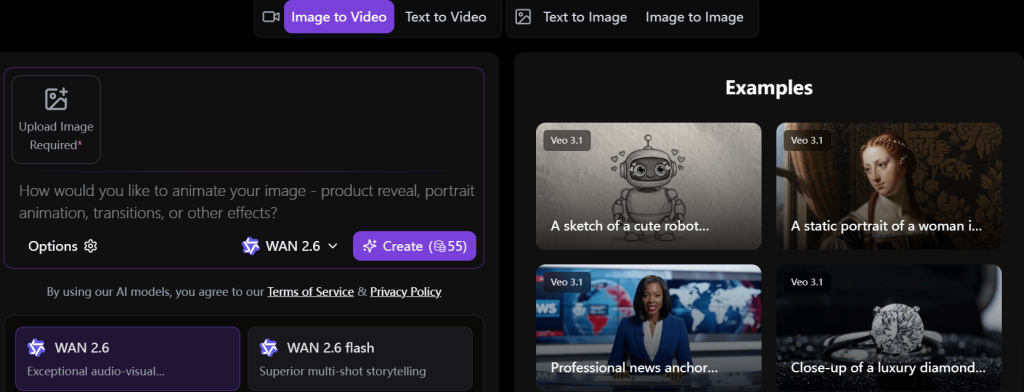
How to Prepare an Image Before Uploading
Flaws and imperfections can introduce confusion. However, the goal of preparation is not to “perfect” the image, but to make it easier for the generation model to understand and animate with clarity and stability.
- Refine Composition
When the main subject is positioned at the edge or surrounded by competing elements in an input image, the animation will be displeasing. A well-balanced composition, however, gives the generator a clear anchor, and that directly improves stability across frames. By centering a subject and ensuring it is clearly framed, creators/users can eliminate ambiguity.
- Lighting
Enhancing brightness, contrast, and the overall clarity can also help to define the edges, textures, and depth of an image. Even so, clean and directional lighting provides a stable visual reference for the generator. With flat or uneven lighting, the generator may misinterpret shapes or tones.
- Resolution
An image that lacks detail cannot provide enough information to maintain structure during animation. However, low-resolution images can be upscaled. And with clarity restored, output consistency can also be improved. The goal is to ensure that important features are sharp and well-defined.
- Reduce Complexity
Background elements that do not contribute to the scene must be simplified or removed. In essence, the image’s background must be intentional, not overwhelmed.
- Check for Completeness and Subject Integrity
Faces, hands, and key structural elements must be visible in the images. Creators must provide a complete reference and ensure that the subject is fully intact.
Overall, these are small, deliberate adjustments that significantly reduce ambiguity and improve how the AI interprets the image.
The Source Image Checklist (Before You Generate)
Here’s how to validate whether an image is ready for animation/motion-ready:
A good source image should have one clear subject that stands out (i.e., no competing elements). It should be high enough in resolution for detail preservation, and with a visible face or clearly defined object for reference. More so, the background should be simple or at least controlled, avoiding unnecessary clutter that could introduce unwanted movement.
Lighting should also be consistent and intentional, and the subject itself should be fully intact (i.e., no cropped faces, missing hands, or cut-off elements). The fewer gaps the model has to fill, the more stable the result will be.
Moreover, it is important to ensure that the scene does not contain too many competing elements because complexity can reduce control and increase unpredictability.
The image should also include at least some subtle indication of motion, whether it’s in posture, hair, fabric, or environmental elements.
When you consistently apply this checklist, you eliminate most of the common failure points and gain more control over the creative process.
Conclusion
In AI image-to-video generation, a good image defines the motion potential (i.e., the possibilities). It sets the boundaries for what the AI can realistically animate. The prompt then works within those boundaries to guide direction, style, and behaviour.
However, when the input image lacks clarity, no amount of prompting or creative freedom (i.e., no restrictions) can compensate. The process will be unpredictable, the output dissatisfying, and the workflow unreliable.