
Wan AI has quickly become one of the most talked-about video generation models in the AI creator community, prized for its cinematic motion, strong prompt adherence, and flexibility across text-to-video and image-to-video workflows. But there’s a gap between “using Wan AI” and “getting consistently great results from Wan AI.” Most disappointing outputs — warped faces, ignored camera moves, subjects that drift off-model — trace back to the same root cause: an unstructured prompt and a poorly prepared source image.
This guide breaks down exactly how to fix that. You’ll learn the proven prompt formula that professional AI video creators use, how to reliably control camera movement, and how to choose and prepare a source image so your image-to-video generations stay coherent from the first frame to the last.
Why Most Wan AI Prompts Underperform
Wan AI doesn’t work like a chatbot. It isn’t trying to guess your intent from casual phrasing — it’s parsing your prompt for distinct, structured signals: what the subject looks like, what environment it’s in, how it moves, and how the camera behaves. When a prompt blends all of that into a single vague sentence (“a girl walking on the beach, cinematic”), the model has to fill in the gaps itself, and it usually fills them in with generic, unpredictable choices.
The fix is to think like a director, not a chatbot user. Every high-performing Wan AI prompt separates its instructions into clear categories, in a consistent order, using concrete and specific language rather than abstract adjectives like “beautiful” or “amazing.”
The Core Prompt Structure That Works
Across text-to-video and image-to-video use cases, the most reliable prompt formula follows this pattern:
Subject + Scene + Motion + Camera Language + Atmosphere + Style
Here’s what each element should actually contain:
1. Subject Description
Describe who or what the video is about, in concrete visual terms. Instead of “a woman,” write “a young woman with short black hair wearing a red trench coat.” Specificity here anchors the model’s understanding of appearance and helps prevent identity drift across frames.
2. Scene Description
Define the environment — real or imagined. Include background and foreground details: time of day, weather, location type, and notable objects. A prompt like “a rain-soaked neon-lit alley at night, steam rising from a street vent” gives Wan AI far more to work with than “a city street.”
3. Motion Description
This is where most prompts fail. Motion needs to describe how things move, not just that they move. Use concrete verbs and intensity modifiers: “hair sways gently in the wind,” “she turns her head slowly toward the camera,” “leaves scatter quickly across the pavement.” Vague motion cues like “some movement” or “dynamic action” get interpreted inconsistently.
4. Camera Language
Explicitly state the camera behavior (covered in depth in the next section). Don’t assume the model will infer an implied camera move from the scene description alone.
5. Atmosphere and Lighting
Light source, lighting quality, contrast, and mood words go here: “soft side light,” “high contrast,” “warm golden-hour tone,” “moody blue lighting.” These cues have an outsized effect on how cinematic the final clip feels.
6. Style
Close the prompt with a style anchor if you want a specific visual treatment: “photorealistic,” “35mm film grain,” “anime style,” “product commercial look.”
A Practical Example
Weak prompt: “A man on a mountain, cinematic video.”
Strong prompt: “A hiker in weathered outdoor gear stands at a cliff’s edge. Wind pushes his jacket and hair steadily. Camera slowly tilts up from his boots to reveal his full figure against a mountain range. Golden-hour side lighting, warm tones, light haze in the distance. Photorealistic, cinematic film look.”
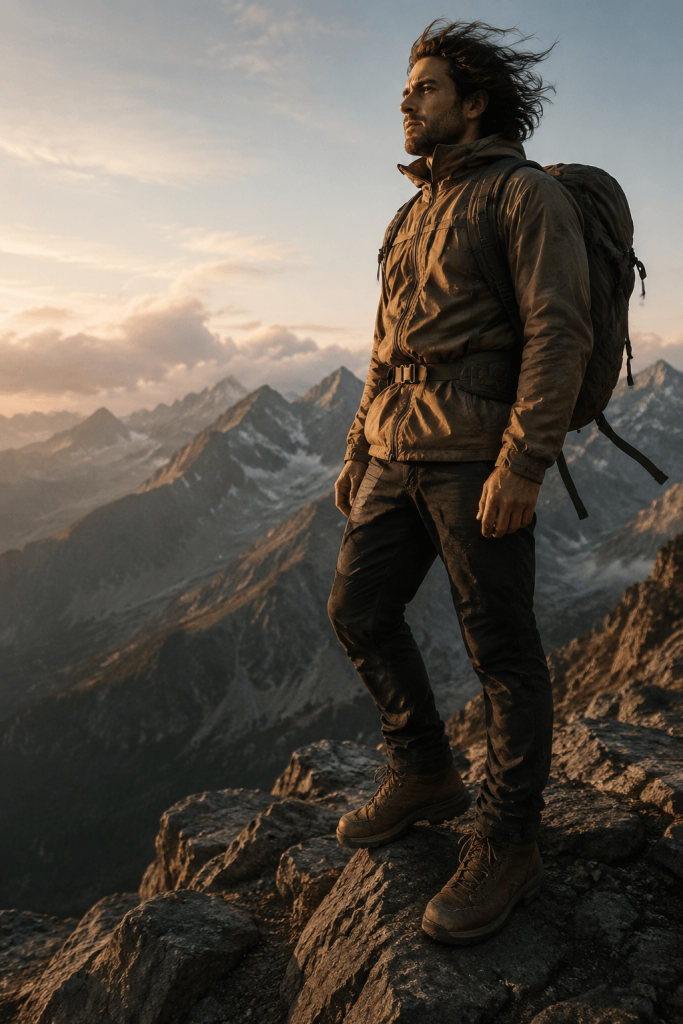
The second version gives Wan AI a subject, a scene, a motion cue, a camera instruction, atmosphere, and style — all the ingredients it needs to produce a coherent, intentional shot rather than a generic guess.
Prompt Length: Find the Sweet Spot
Prompts that are too short leave too much to chance; the model defaults to generic choices. Prompts that are too long — especially ones packed with conflicting instructions — can cause the model to ignore details or produce muddled results. Aim for a focused paragraph, roughly 80–120 words, with one clear motion idea and one clear camera move per generation. If you need more complexity, it’s often better to generate multiple shots and stitch them together than to cram five ideas into one prompt.
Mastering Camera Control in Wan AI
Camera control is what separates a flat, AI-generated clip from something that looks genuinely directed. Wan AI responds to explicit camera language, but it has real limitations you should plan around.
Use Direct, Unambiguous Camera Phrases
Stick to clear, filmmaking-standard terms rather than inventing your own vocabulary:
- Push in / Zoom in — camera moves or lens zooms toward the subject
- Pull back / Zoom out — camera moves or zooms away from the subject
- Pan left / Pan right — camera rotates horizontally
- Tilt up / Tilt down — camera rotates vertically
- Tracking shot / Follow shot — camera moves alongside a moving subject
- Orbit — camera circles around the subject
- Fixed camera / Static shot — explicitly locks the camera in place
If you don’t specify anything, don’t assume the camera will stay still — always state “fixed camera” or “static shot” if that’s what you want, since an unspecified camera can drift unpredictably.
Keep It to One Movement at a Time
Combining multiple camera moves in a single short clip (a pan that also zooms while orbiting) tends to confuse the model and produce jittery or static results instead. Choose one dominant camera movement per generation. If your concept genuinely needs multiple moves, plan it as multiple shots.
Respect the Model’s Motion Limits
Fast, aggressive camera actions — whip pans, rapid zooms, sudden direction changes — are consistently the least reliable category of camera instruction. Gradual, continuous movement (a slow dolly, a gentle tilt, a soft orbit) produces far more natural, coherent results. If a camera move looks static or ignored in your output, don’t assume you did something wrong — try softening the instruction and simplifying the rest of the prompt around it.
Direction Isn’t Always Guaranteed
Even with well-written prompts, camera direction (specifically left-vs-right pans or precise angle amounts) can require a few regenerations to land correctly. Treat your first generation as a draft, and refine the wording — not just the settings — if the direction comes out wrong.
Getting Better Results from Your Source Image (Image-to-Video)
For image-to-video generation, your source image isn’t just a starting point — it’s half of your prompt. A poorly chosen or poorly prepared image will fight against even a perfectly written text prompt.
Choose a Clean, High-Resolution Image
Blurry, low-resolution, or heavily compressed images introduce artifacts that get amplified once motion is added. Start with the highest-quality image you have, ideally shot or rendered with clear focus on your subject.
Favor Simple, Uncluttered Compositions
Busy backgrounds, overlapping subjects, or ambiguous depth cues make it harder for the model to understand what should move and how. A single clear subject against a legible background gives the model far more room to animate convincingly.
Match Your Prompt to What’s Actually in the Image
This is the single most common source image mistake: writing a prompt that describes elements not present in the photo. Wan AI’s image-to-video mode animates what already exists in the frame — it doesn’t invent new objects, characters, or scenery. If your image shows a still portrait with no visible hair strands or fabric, don’t prompt for “hair blowing wildly” or “cape flowing in the wind.” Instead, describe motion for elements that are visibly present: eyes blinking, subtle head turns, breathing, background elements like clouds or water.
Front-Facing, Well-Lit Subjects Work Best for Portraits
If you’re animating a person, front-facing or near-front-facing portraits with even, clear lighting produce the most stable results. Extreme angles, harsh shadows across the face, or partially obscured features increase the risk of warping or distortion during motion.
Start With Small, Natural Movements
Before attempting complex, multi-element animation, test your source image with a simple motion prompt — gentle wind, a slow blink, subtle camera drift. This helps you confirm the image is stable and well-suited to animation before you invest in a more ambitious, detailed prompt.
Always Use a Negative Prompt
Whether or not your main prompt is perfect, a negative prompt is essential insurance. Standard exclusions worth including: morphing, warping, distorted face, extra fingers, blurry, low quality, flickering, inconsistent motion, cluttered background, static. This single addition eliminates a large share of the artifacts that otherwise show up in image-to-video generations.
Putting It All Together: A Repeatable Workflow
- Pick or shoot a clean, high-resolution source image (for image-to-video) with a clear subject and simple composition.
- Write your prompt in order: subject, scene, motion, camera, atmosphere, style — keeping it to roughly 80–120 words.
- Choose one camera movement, described explicitly and kept gradual rather than fast or complex.
- Match your motion description to what’s actually visible in your source image — don’t animate things that aren’t there.
- Add a negative prompt to filter out common artifacts.
- Generate, review, and adjust one variable at a time — motion, camera, or lighting — rather than rewriting the whole prompt after every attempt.
- Treat early generations as tests, not finals. Camera direction and motion intensity often need one or two refinement passes to land exactly right.
Final Thoughts
Getting consistently strong results from Wan AI isn’t about luck or endless trial and error — it’s about giving the model structured, specific, and internally consistent instructions. A well-ordered prompt tells Wan AI exactly who the subject is, where they are, how they move, and how the camera should behave. A well-prepared source image gives the model a stable, legible foundation to animate. Combine both, add a solid negative prompt, and you’ll spend far less time regenerating and far more time producing footage that actually looks directed.
Master these fundamentals — prompt structure, camera control, and source image preparation — and Wan AI stops feeling unpredictable and starts feeling like a genuine creative tool you can direct with intention.