
In AI image-to-video generation, concepts like “no watermark,” “no signup,” and “no restrictions” are often grouped as if they offer the same/equal value. However, each one solves a completely different issue in the creation process. “No signup” deals with access and how quickly creators can get started. “No watermark” determines the usability of the output. “No restrictions,” more than the others, influences how much control creators have over the process and the outputs.
This article examines what each concept really means in practice, where it helps, where it falls short, and it also answers the question of which one matters most to creators, based on their respective workflows.
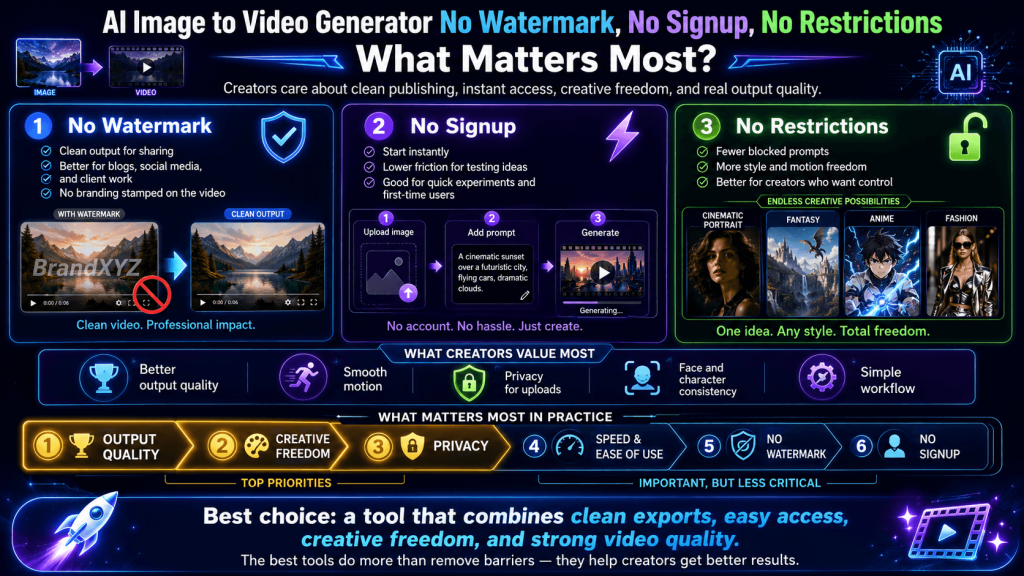
Breaking Down the Three Features (What They Really Mean)
In practice, “no watermark,” “no signup,” and “no restrictions” operate at different stages in the creation process, and they address entirely different challenges.
“No signup” sits at the very beginning of the user experience, because it removes the barrier to entry. More so, creators get instant access to the generator (i.e., without creating an account, verifying an email, or committing to a platform). This also gives the impression of pure convenience because it lowers friction, encourages experimentation, and makes it easier for new users to test the generator’s capabilities without hesitation. However, this feature has little to do with the output quality or consistency, and neither does it influence how the AI interprets prompts. It simply determines how quickly one can get started.
“No watermark,” on the other hand, comes into play at the final stage of the workflow (i.e., the output). A watermark can make a commercial or brand AI-generated video appear unfinished, unprofessional, or unsuitable for publishing. However, removing it gives creators clean, presentation-ready results that can be shared, monetized, or even delivered to clients — it improves usability. Nevertheless, it has no impact on creative freedom or content generation.
“No restrictions,” however, has to do with the creation process itself. Unlike the other two concepts, “no restrictions” directly influences how much control users have over the process and the outcome, from prompt interpretation to motion behaviours to camera movements to stylistic details to intent.
When observed through this lens of entry, creation, and output, it becomes glaring that the concepts are not interchangeable, but influence and benefit different aspects of an AI image-to-video generation workflow.
No Signup: Fast Access, But Limited Workflow
The appeal of “no signup” is that it removes friction. User lands on a generator, uploads an image, types a prompt, and generates a video within seconds. There’s no account creation, no email verification, and no hassling onboarding steps. For first-time users or anyone casually exploring AI image-to-video tools, instant access lowers the commitment barrier and makes experimentation rather effortless.
However, since there is no account system, the generator inherently has no way to store your work, preferences, or history. This means that every session is temporary and, by implication, if you refresh the page, switch devices, or come back later, your previous generations will be gone. So, there is no project continuity.
There’s also the question of resource control because some generators that do not require signup often impose constraints such as capped generations per session, reduced rendering quality, or restricted access to advanced features to manage usage. More so, these constraints determine how far creators can use/push the generator.
Nevertheless, “no signup” works best for testing ideas, exploring the system’s capabilities, or getting a feel for how AI image-to-video generation works.
In other words, “no signup” solves the challenge of getting started, but not that of getting serious work done.
Users gain immediate access, only to lose long-term usability.
No Watermark: Clean Output, But Not Always Free
A visible watermark can undermine credibility, distract viewers, and limit how professional the content is perceived.
A “no watermark” workflow, therefore, promises a clean and ready-to-use output that does not need additional editing or cropping (i.e., it is usable in the real world). In theory, this means whatever creators generate is theirs to publish, share, or monetize.
However, watermark removal is not a default feature in many AI image-to-video generators — it is an upgrade. Basically, the “no watermark” claim might be tied to conditions like paid plans, credit usage, limited exports, or higher rendering tiers. In other words, the absence of a watermark sometimes comes at the cost of unlocking a premium output layer.
Even when watermark-free exports are available, they may still come with constraints that affect usability (e.g., resolution caps, shorter video durations, or restricted frame quality). So while the video may technically be “clean,” it may not yet meet the standards required for high-quality production or commercial use.
This makes “no watermark” a concept that improves presentation, but not creation.
To put it simply, a watermark-free output is essential for a creator whose goal is to publish professional and brand-ready AI video. However, if the goal is to shape the animation according to your intent, then “no watermark” alone won’t get you there.
No Restrictions: The Concept That Shapes AI Image-to-Video Generation
In practical terms, “no restrictions” is not about bypassing safety systems or accessing hidden features but about control. Control over prompts, motion behaviour, camera dynamics, visual consistency, and the overall creative experience.
When a generator imposes restrictions, the system tends to simplify or rewrite the input prompt, limit motion interpretation, or override complex instructions with safer and more generic outputs. Although the result of a restricted workflow may be acceptable, it cannot fully reflect the creator’s intent.
However, when those restrictions are removed, creators gain control. Thanks to this, when creators specify subtle motion, the system is more likely to preserve that subtlety, and when they define a particular style or lighting condition, the model is less likely to drift. In image-to-video generation, where it is paramount to maintain subject identity and control motion, this degree of precision is an advantage.
In addition, creators get to refine their outputs more predictably and iterate smoothly because the system (with fewer restrictions) behaves more consistently in response to their instructions.
Moreover, “no restrictions” influences every stage of creation, not just one. It affects the early stages (prompt input), how the scene evolves (motion and camera behaviour), and how the final output appears (style consistency and coherence). Therefore, it is a condition that shapes the entire workflow.
In essence, “no restrictions” has the greatest impact for creators who care about precision, consistency, and creative intent because it is the only concept that directly influences the AI’s performance and response to input.
Why Most AI Image-to-Video Generators Rarely Offer All Three
Every generator operates within the constraints of computational cost, infrastructure limits, and business models because image-to-video generation is resource-intensive. Therefore, allowing unrestricted prompt behaviour requires more advanced processing and fewer guardrails, which also increases the likelihood of unstable outputs and higher compute usage. At the same time, offering watermark-free exports removes a key incentive for users to upgrade or pay. And eliminating signup removes the generator’s ability to manage usage, track demand, or build a sustainable user base.
Because of this, most tools prioritize one or two of these features while compromising on the others.
For example, a generator that offers no signup and no watermark often does so by limiting how much users can generate. And users might get a few free exports, lower-quality renders, or shorter video durations.
Some generators lean into no signup and no restrictions, giving users prompt freedom without requiring registration. However, these too often struggle with stability, consistency, or scalability because it is difficult to track or predict performance.
This reveals that each of the concepts fundamentally carries a cost, and that cost has to be absorbed somewhere, either by the system or by the user.
The key takeaway is that “no watermark,” “no signup,” and “no restrictions” are not just benefits; they are also tradeoffs.
Why “Unlimited” Usually Still Has Technical Limits
“Unlimited” is another interesting concept in AI image-to-video generators. Unlimited video generations, unlimited access, and unlimited creativity suggest complete freedom without constraints.
Most generators that advertise unlimited usage are still operating within very real technical boundaries. Moreover, the generation speed may slow down after repeated use, the output quality may vary depending on system load, and the sessions may be capped by hidden time or resource limits. In some cases, “unlimited” simply means you can keep generating, but only at a lower priority or reduced performance level.
There are also model-level limitations that no tool can fully remove. AI image-to-video systems still struggle with motion consistency, subject stability, and style coherence across frames. These are not access issues but inherent technical challenges.
Even so, AI video generation is computationally expensive; therefore, the system has to balance user demand with the available resources by enforcing soft limits through queue systems, credit throttling, or reduced rendering speeds during peak times.
Overall, the “unlimited” concept is best understood as a positioning term, not a literal promise.
Which Concept Matters Most?
The value of no signup, no watermark, and no restrictions depends entirely on use cases and workflows (i.e., what creators are trying to achieve).
For a user just starting out or casually exploring AI image-to-video, “no signup” might come off as the most important feature because it removes friction and allows immediate experimentation. At this stage, the goal is not perfection; it is discovery. And being able to test prompts, see how images animate, and understand the basics for free is what matters most.
For creators who publish content for social media, personal branding, or small projects, “no watermark” is more significant, and for good reason. In any professional application, a clean output is very important as it distinguishes a demo from a polished animation. Even if control is somewhat limited, a watermark-free result can still be usable, shareable, and visually credible.
However, for consistent quality, specific motion direction, stylistic control, client-level work, or high-volume creators, “no restrictions” takes priority. If users cannot guide the motion, stabilize the scenes, or maintain a style across frames, the outputs will be unusable regardless of whether there is a watermark or not. “No restrictions” enables better prompts, more reliable results, and faster refinement. And this has a much greater impact on productivity and quality.
Ultimately, the concept that matters most is the one that aligns with the user’s/creator’s current objective.
Bottom Line: What You Should Actually Prioritize
When you strip away the marketing language and feature stacking, the concepts have their roles/place. “No signup” is about convenience; it gets you in the door quickly and lowers the barrier to entry. “No watermark” is about usability; it determines whether your output is ready to be shared, published, or presented without compromise. But “no restrictions” is about control, and that’s the feature that ultimately defines what you can create.
Clearly, they are not equal in long-term value; however, what matters most depends on where you are in your creative process, and the concept that removes the biggest limitation in your workflow.