
In AI image-to-video generation, the generator does the creative work, and the image provides the foundation. However, the prompt shapes what moves, how it moves, and how controlled or chaotic the output will be.
Moreover, no-restriction generators allow prompts to pass through with far greater fidelity, which also means that instructions/descriptions will be taken more literally. A structured prompt library, however, offers real and practical value to creators by removing the hassle of trial and error. Creators get to use tested and proven prompts to produce stable and high-quality animations, and they also learn to recognize the best prompts for specific outcomes.
In this prompt library, No-Restriction prompts are organized by real-world use, and each prompt is practical, reusable, and effective in no-restriction workflows — not just what to use, but when and why to use it.
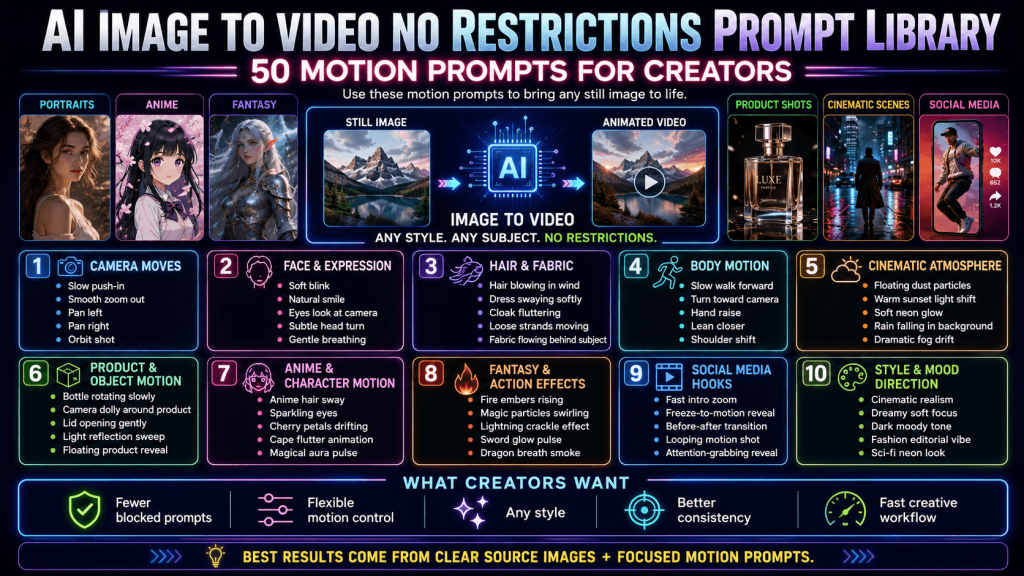
How to Use This Prompt Library (Before You Copy Anything)
Image-to-video prompting is about directing motion. The model already “sees” the image. Therefore, what it needs from users/creators is motion instructions.
In practice, effective prompts follow a simple structure of a subject, a motion type, an intensity level, and sometimes a camera instruction. As opposed to a descriptive and long text input in text-to-video generation, the system needs a concise direction on what moves, how it moves, and how subtle or strong that movement should be. This clarity reduces ambiguity, which is one of the main causes of visual glitches and inconsistent motion.
Moreover, it is not advisable to stack too many actions into a single prompt. One or two well-defined motions can outperform a complex combination. Subtlety looks more natural and also preserves the integrity of the original image.
It is also important to think of prompts as modular (i.e., one does not need to rely on a single line every time, and can adapt and combine elements). A base motion can be paired with a camera push-in to create a more cinematic feel. The flexibility comes from understanding what each part of the prompt does, rather than treating it as a fixed formula.
Approach this library, then, not as a list to copy blindly, but as a toolkit to draw from. The more you understand how each prompt directs motion, the more control you gain, and the more consistently you’ll be able to produce clean, high-quality video outputs.
Portrait & Character Motion Prompts (Human, Influencer, Avatar)
Portrait and character-based images are common and very sensitive inputs in AI image-to-video generation. Subtle changes can bring a character to life, but too much motion can cause distortion, identity drift, or unnatural expressions.
The most effective prompts in this category focus on micro-movements (e.g., blinking, breathing, shifts in gaze, or changes in facial expression). Unlike facial features, which are more prone to distortion, secondary elements like hair strands or fabric edges can move more freely without breaking the identity of the subject. And this makes them ideal for adding life to an otherwise static image.
Portrait motion should almost always lean toward the “slow” and “subtle” pacing because fast or exaggerated movement can cause artifacts around the eyes, mouth, and jawline. By keeping motion minimal and controlled, you allow the model to maintain structure.
Below are high-utility, reusable prompts for portraits and character images:
- Slow blink, slight head tilt, calm expression, gentle motion.
- Slight eye movement following a fixed point, soft natural expression, controlled and stable motion.
- Soft smile gradually forming from neutral expression, minimal facial movement, slow and natural transition, and maintaining facial structure.
- Wind effect moves hair strands gently, face remains stable and unchanged, subtle environmental motion only.
- Forward head movement with micro-adjustment, soft eye focus change, minimal and realistic motion.
- Blinking combined with tiny eyebrow movement, soft emotional expression change, stable face, and low intensity motion.
- Posture adjustment with slight shoulder shift, minimal head movement, natural breathing, maintain full facial clarity and proportions.
- Subtle gaze shift upward, relaxed face, slow movement.
Each of these prompts is intentionally simple. They focus on one or two significant actions to keep the output stable and predictable. They can also be paired for more depth (e.g., a blink with a camera push-in.
The key takeaway is that portrait motion is about restraint and precision. The goal is not to animate the entire face but to suggest life and simulate real motion with minor actions.
Camera Movement Prompts (Stable, Cinematic, High-Impact)
Camera movement prompts deliver stable and high-quality results consistently. As opposed to subject animation, where the face, object, or proportion can be distorted, camera motion works around the image. It is a very safe, versatile, and effective method of introducing motion.
Camera prompts are essentially instructions that direct the “lens” or viewing perspective of the scene.
Camera movement prompts:
- Cinematic push-in toward the subject and a steady camera movement.
- Gentle zoom-out revealing more background, slow and stable camera motion.
- Slight left-to-right pan with no parallax effect, smooth and continuous flow, while the subject remains centered.
- Extra slow cinematic push-in with subtle depth of field shift, maintaining sharp focus on subject.
- Gradual zoom-in with soft easing, no abrupt movement, preserving facial and object integrity.
- Diagonal camera movement to add a cinematic floating perspective.
- Controlled micro-orbit camera movement around subject, extremely subtle parallax, no subject distortion.
- Viewing angle push-in with slight vertical tilt, simulating a stable handheld cinematic framing.
The key is to let the camera do most of the work while keeping the subject grounded.
Social Media Hook and Loop Prompts (TikTok, Shorts, Reels)
Hook-based and loop-friendly prompts are exclusively for short-form platforms where the goal is to catch/hold the viewer’s attention, encourage repeat views, and improve engagement.
The hook is usually a noticeable micro-movement that can create a visual disruption that the eye cannot ignore. A loop, however, enables the animation to flow continuously, and this directly impacts watch time and completion rate, both of which are critical for distribution on TikTok, Shorts, and Reels.
More so, social media audiences process visuals quickly and on small screens. Therefore, the motion must be clean, easy to understand, and keep viewers intrigued enough to keep watching.
No-Restriction prompts for hooks and seamless loops
- Subtle continuous zoom-in loop, no visible start or end, smooth and seamless motion.
- Gentle light flicker across subject, repeating loop, soft glow variation, no abrupt changes.
- Micro head movement with slow return to original position, natural blink loop, continuous and seamless replay.
- Slow breathing motion with minimal movement, perfectly loopable, calm, and natural.
- Soft wind effect moving hair or fabric continuously, seamless looping animation.
- Gradual push-in combined with subtle brightness shift, continuous loop with no reset point.
- Repeating glow pulse effect on subject, soft intensity changes, smooth infinite loop.
- Continuous diagonal zoom with no hard stop, maintaining visual consistency across loop.
These prompts prioritize clarity and ensure that the subject remains the focal point. Even so, their output captures attention and encourages the viewer to watch again.
Product and Commercial Motion Prompts (Ads, Showcases, Ecom)
Product-focused image-to-video generation is less about creativity and more about clarity, control, and perceived value. Therefore, the object must remain recognizable, clean, and consistent throughout the motion because any distortion in shape, edges, or branding will reduce credibility.
An effective approach is to introduce movements that can highlight the product’s form, material, or finish. In essence, lighting and camera movement will do most of the work.
Floating or hovering effects are also commonly used for digital products or stylized ads because they add a premium or modern feel to the output.
Here are some, tailored for product and commercial use cases:
- Smooth product rotation, maintaining shape accuracy and edge clarity.
- Floating motion with soft shadow beneath, stable product form, premium presentation.
- Subtle light reflection moving across the surface, clean and controlled highlight sweep.
- Floating product with slight vertical drift, soft ambient lighting, minimal environmental movement.
- Controlled highlight sweep across a metallic or glossy surface, smooth and continuous motion.
- Slow orbit camera movement around product, minimal parallax, preserving structural integrity.
- Gentle hover effect with subtle reflection change beneath product, stable and clean composition.
- Slow zoom-in with soft glow accent on edges, maintaining product sharpness and realism
These prompts prioritize clarity, stability, and polish. Their motion enhances the product’s appearance without compromising its structure.
Anime, Fantasy, and Stylized Motion Prompts
Prompting in stylized content (i.e., anime, fantasy, and character art) controls the motion and protects the original style and structure of the artwork.
Environmental or effect-based motion also adds a unique richness and atmosphere to stylized themes. However, creators must separate the subject from the secondary elements (e.g., hair, clothing, or magical effects) to ensure a balanced composition. This also reduces the risk of identity drift.
Anime and Stylized Character Motion
- Subtle blink and eye movement, minimal facial change, clean line preservation.
- Gentle hair sways in light wind, character remains still, smooth stylized motion.
- Head tilt with calm expression, slow controlled movement.
- Idle breathing motion, subtle chest movement, stable anime face, and proportions.
- Soft smile forming gradually, minimal expression change, clean animation style.
Fantasy and Effects-Based Motion
- Soft glowing aura around character, gentle pulsing light, stable subject, minimal distortion.
- Magical particles slowly drifting around the subject, smooth, continuous motion, no clutter.
- Cloak/robe flowing in light wind, controlled fabric movement, character remains stable.
- Subtle fire flickers nearby, soft lighting changes, cinematic fantasy atmosphere.
- Glowing energy effect with slow rhythmic pulse, clean and controlled visual intensity.
These prompts ensure natural extension of the original artwork, not a transformation or reinterpretation of it.
Cinematic, Horror, and Mood-Based Motion Prompts
Mood-related visuals rely less on visible action and more on atmosphere. In cinematic and horror-style image-to-video outputs, the goal is not to animate the subject heavily, but to create tension, emotion, or immersion through controlled environmental changes.
Cinematic motion is all about scene control and pacing. These micro-adjustments have the ability to guide the viewer’s attention and create a sense of progression without obvious action. More so, lighting (e.g., flickers, soft glows, and shadows) and environmental elements (e.g., fog, smoke, or distant particles) enhance the depth and realism of mood-related outputs.
Cinematic, horror, and mood-based motion prompts
- Slow cinematic camera creep forward, dark atmosphere, subtle tension buildup, no abrupt motion.
- Flickering light source casting moving shadows, eerie environment, minimal subject movement.
- Gradual shadow movement across the scene, low lighting, suspenseful mood, stable composition.
- Faint fog drifting slowly across the foreground, soft continuous motion, atmospheric depth.
- Subtle light flicker with gentle brightness variation, no harsh transitions, moody ambiance.
- Sideways camera drift, revealing more of the scene, and suspenseful pacing.
- Environmental movement with slight glow changes, maintaining dark cinematic tone.
- Soft smoke or mist movement in the background, slow and natural, subject remains stable.
These prompts build on the atmosphere and rely on environmental cues and camera behaviour to simulate emotion.
Takeaway
A prompt library is only as valuable as how creators use it. The more you understand what each one does, the less you depend on trial and error, and the more efficiently you can create.
What distinguishes average outputs from high-quality ones is not creativity alone, but control.