
As AI image-to-video tools become more popular, creators are searching for platforms that offer greater creative freedom. This is why the phrase “AI Image to Video Generator No Restrictions” has attracted so much attention. However, the term is often misunderstood.
For most creators, “no restrictions” does not mean ignoring safety or responsibility. It means avoiding unnecessary creative blocks. It means being able to experiment with ideas, animation styles, camera movements, and motion prompts without constantly running into filters that misunderstand legitimate artistic work.
At the same time, creative freedom alone is not enough. The biggest challenge in image-to-video generation is not simply removing restrictions. It is creating videos that maintain visual consistency, preserve the subject’s appearance, and produce controllable, realistic motion. These remain some of the most important technical challenges in modern AI video generation.
In this guide, we’ll explore what “no restrictions AI video generator” really means, how these tools work, their practical limitations, and why the best platforms combine flexibility, quality, and responsible use to help creators bring their ideas to life.
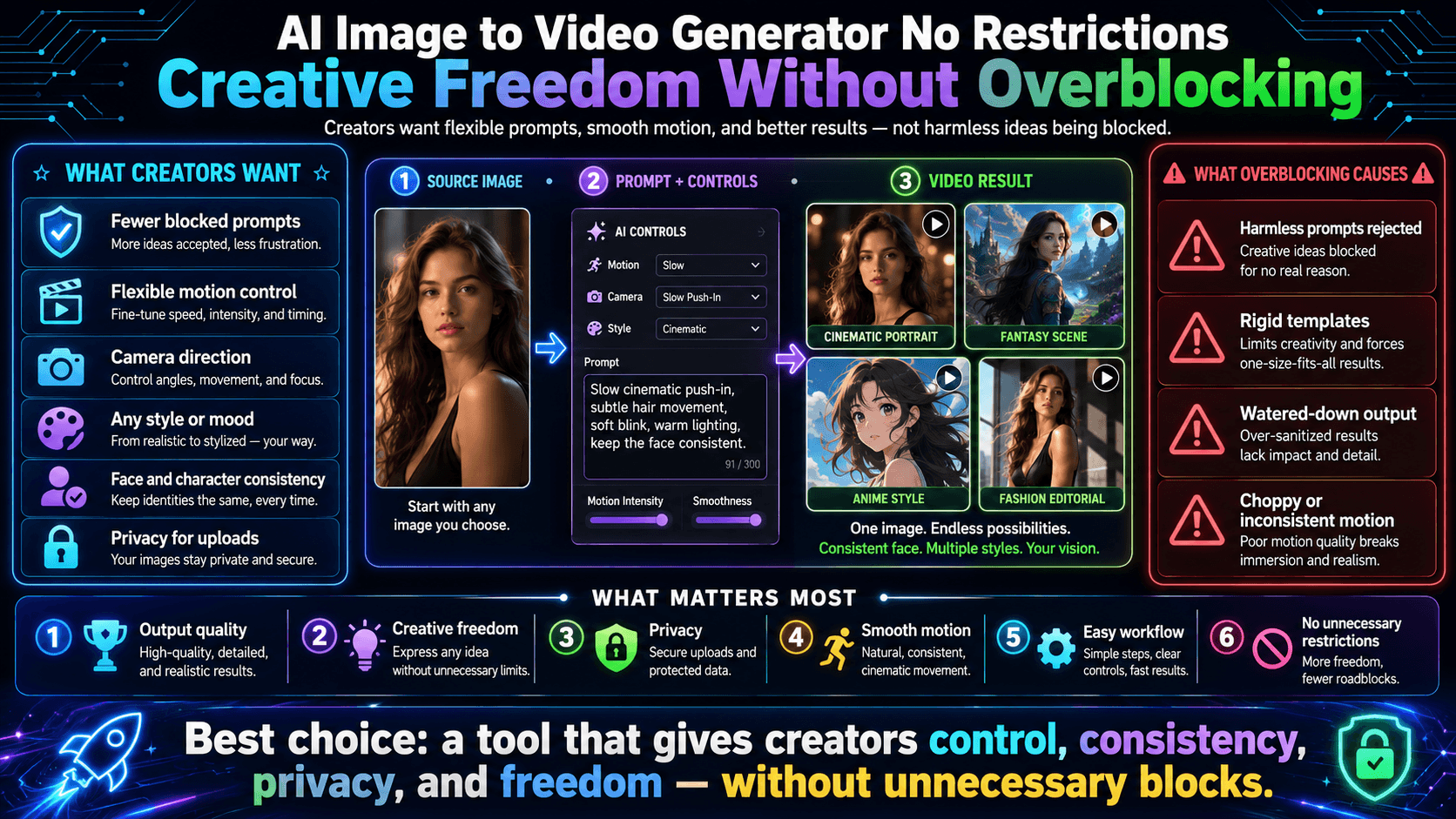
What Does “No Restrictions” Mean in AI Image-to-Video?
The phrase “no restrictions” sounds absolute. It feels powerful. Almost like opening a locked door and finally stepping into an open sky.
But in the world of AI image-to-video generation, the meaning is more subtle. It is not about removing all rules. It is about reshaping the relationship between creativity and limitation.
At its core, “no restrictions” usually refers to fewer unnecessary creative barriers. It means the system allows a wider range of prompts, styles, and artistic directions without interrupting the user’s imagination at every step.
It is not chaos. It is freedom with structure.
Creative Freedom vs Content Safety
Every AI system stands on a thin line between two responsibilities.
On one side is creative freedom. On the other side is content safety.
Creative freedom allows users to explore ideas, experiment with motion, and bring imagination into visual form. Content safety ensures that the technology is not used to generate harmful, illegal, or non-consensual material.
The tension between these two is constant.
If a system becomes too strict, it starts blocking harmless creativity. A fantasy scene may get flagged. A cinematic concept may be rejected. Even artistic experimentation can feel interrupted.
If a system becomes too loose, it risks misuse, legal issues, and ethical harm.
So the real challenge is balance.
The best AI tools do not remove safety. Instead, they refine it—trying to reduce unnecessary interruptions while still protecting users and communities.
Why Many AI Tools Apply Strict Filters
Strict filters are not created without reason. They exist because AI systems operate at scale, and scale introduces risk.
One reason is legal compliance. Platforms must follow laws across different countries. These laws often vary and require cautious moderation.
Another reason is brand safety. Companies want to avoid misuse of their tools in ways that could damage trust or reputation.
A third reason is technical limitation. AI models do not truly “understand” intent like humans do. They rely on pattern recognition. This sometimes leads to overcorrection, where harmless prompts get blocked simply because they resemble risky patterns.
This is why users often experience frustration. The system is not trying to block creativity—it is trying to avoid uncertainty.
But in doing so, it sometimes blocks too much.
The Problem of Overblocking Legitimate Creative Projects
Overblocking is one of the most common complaints among creators.
A filmmaker trying to generate a cinematic scene may get an error message. An artist experimenting with stylized characters may find their prompt rejected. A marketer trying to create an imaginative product animation may face unexpected limitations.
A director trying to show post-coital exhaustion cannot render the wet sheen on a woman’s inner thighs without the tool refusing. A comic artist needs to depict a bloody but fictional battle wound, yet the system mistakes dramatic gore for illegal content.
Medical educators cannot animate a realistic incision because the model has been taught that any open flesh equals harm. These blocks do not protect anyone; they simply starve stories of the physical details that make them believable.
In these cases, nothing harmful is being created. Yet the system behaves as if there might be risk.
How Flexible Platforms Reduce Unnecessary Restrictions
More flexible AI platforms began shifting away from rigid keyword filters after creators repeatedly watched their prompts get rejected for reasons that had nothing to do with harm.
Prompt Examples
Take the case of Lena, a freelance animator in Berlin who wanted a rainy cyberpunk alley scene. Her prompt described a woman in a tight leather coat, neon reflections sliding across wet pavement, slow-motion droplets tracing the line of her collarbone.
The older system blocked the entire request because the phrase “leather coat” triggered an automated “suggestive clothing” rule. A flexible platform read the full context—atmospheric lighting, cinematic mood, no explicit sexual framing—and rendered the shot exactly as written. The coat clung when wind hit, water followed the curve of her breast, the camera drifted low and slow without interruption.
Another example is Marco, an indie game developer in São Paulo. He needed a looping fight animation between two fighters in an underground ring. His prompt included sweat-slicked skin, muscles flexing, one fighter’s thigh locked around the other’s waist, audible grunts and heavy breathing.
Rigid filters flagged the words “thigh locked” and refused to generate anything. The flexible system recognized athletic contest and dramatic tension, then produced the sequence with realistic skin sliding, veins standing out on forearms, and the sharp exhale when one fighter gained the upper hand. Marco could adjust the circling camera angle in real time instead of rewriting the entire prompt.
Visual Styles
Flexible platforms also accept a wider range of visual styles without forcing creators to sanitize their language. Sofia, a concept artist in Seoul, wanted to turn a still painting of a nude figure into a slow-motion fantasy sequence where the character’s hair floated in zero gravity and glowing runes traced across bare skin.
Older tools rejected the prompt outright because of the word “nude.” Newer systems allowed the full description.
User Control Over Motion and Style
The second major improvement is giving users direct tools instead of blocking ideas before they begin.
Lena used a motion-control slider to set the exact speed of raindrops hitting the coat, then dialed camera behavior from a wide tracking shot to an intimate close-up on water running down the character’s stomach. She adjusted style intensity with a single dial, moving from photorealistic neon reflections to a more painterly, high-contrast look without rewriting the prompt.
Marco used the same controls to emphasize the fighters’ breathing. He set the audio layer so each grunt came out as a raw, throaty “huh—huh—huh” timed to the impact of fists. A strength slider let him increase the visible tension in the locked thigh, making the muscle quiver under sweat without triggering any new blocks.
Sofia used the style-expansion tools to blend fantasy and abstract elements. She told the system to render the floating figure with both realistic skin texture and glowing particle effects that moved like liquid light across her nipples and hips. The platform accepted the prompt as written and let her refine the motion path frame by frame.
What Users Usually Mean by “No Restrictions”
When creators type “no restrictions” into search bars, they are almost never asking for a lawless free-for-all. They want practical freedom to describe ideas without constant rejection.
Lena tested a new scene. The cyberpunk woman took off her leather coat. Rain ran down her bare skin. Her nipples got hard from the cold. Water drops slid over her ass. The video played without stopping.
Marco made a fight scene. One fighter held the other on the mat. Their bodies pressed close. You could see the shape of their hard cocks through wet clothes. The system kept the scene and did not block it.
Why Complete Absence of Rules Is Rare
Despite the desire for total freedom, a completely unrestricted system is almost never possible in practice.
There are several important reasons for this.
Legal requirements
AI platforms must follow laws that differ across countries. These laws regulate what kind of content can be generated or distributed.
Platform policies
Companies set rules to protect their tools from misuse and to ensure responsible usage at scale.
Abuse prevention measures
Without safeguards, any powerful creative tool can be misused in harmful ways. Preventing this requires moderation systems.
Ethical considerations
Beyond law and policy, there is also responsibility. Technology that generates visual media must consider its impact on individuals and society.
These factors ensure that even the most flexible systems still operate within some boundaries.
The real innovation, therefore, is not removing rules completely. It is making those rules smarter, less intrusive, and better aligned with human creativity.
How AI Image-to-Video Generation Works
AI image-to-video generation has become one of the most exciting tools in the creative world. It lets you turn a single static image into a dynamic, moving video with just a few clicks. Whether you’re a filmmaker, digital artist, marketer, or hobbyist, this technology opens up new storytelling possibilities. Here’s a clear, step-by-step breakdown of how it works.
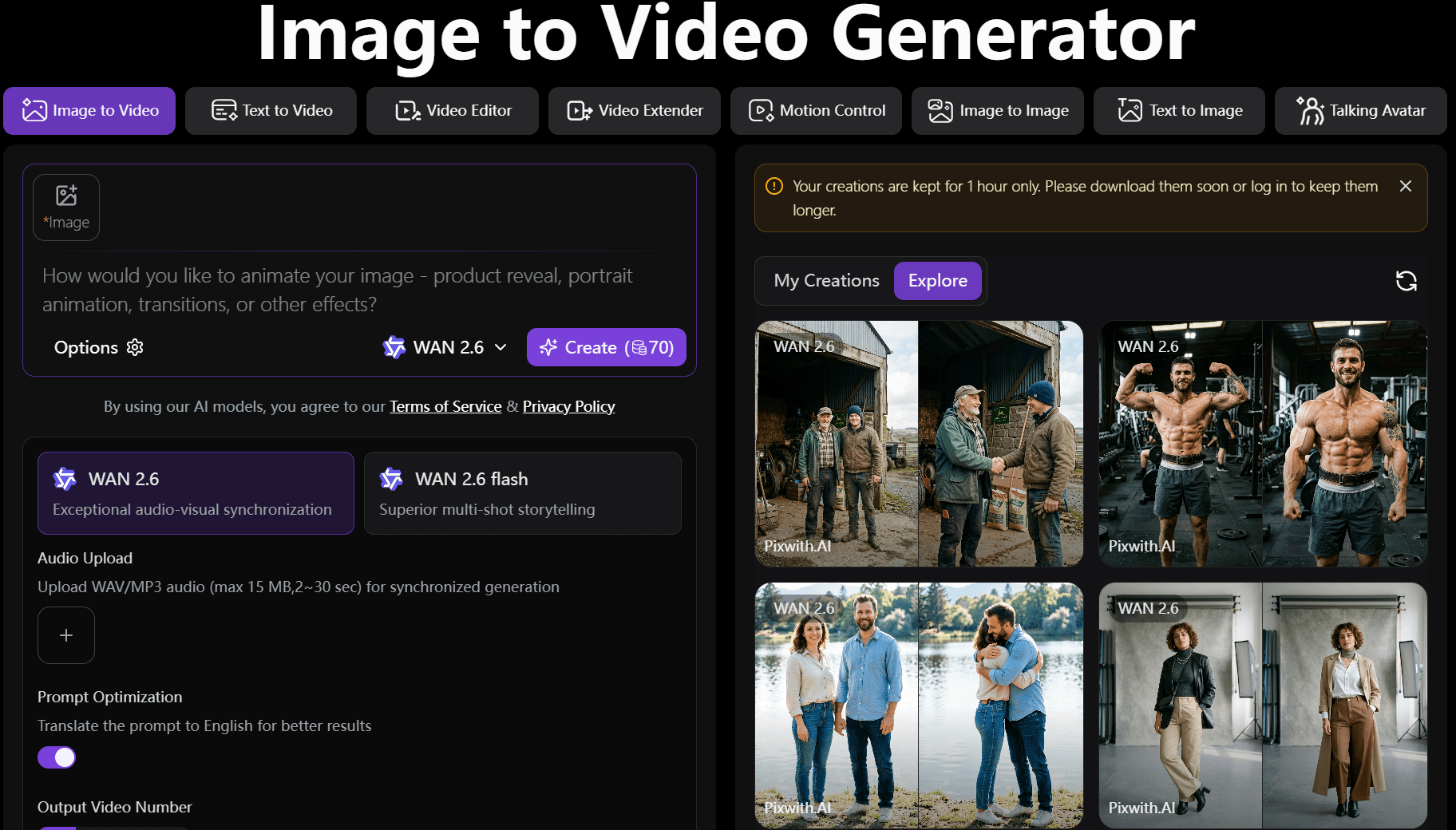
Step 1: Upload an Image
The process begins with your starting point — a still image. This can be almost anything:
- Photos: Real-world shots from your camera roll, like landscapes, portraits, or product photos.
- AI-generated artwork: Images created with tools like Midjourney or DALL-E.
- Product images: Clean shots of items you want to showcase in motion.
- Character illustrations: Drawings, concept art, or anime-style characters that you want to bring to life.
The AI analyzes the image’s composition, lighting, subjects, and details to understand what it’s working with. High-quality, well-lit images with clear subjects tend to produce the best results.
Step 2: Add a Motion Prompt
This is where the magic happens. Instead of just describing the final scene, you tell the AI how the image should move. Good prompts combine several elements:
- Camera movement instructions: “Slowly pan left across the mountain range,” “dolly zoom in on the character’s face,” or “orbit around the product.”
- Character actions: “The woman walks gracefully toward the camera while her dress flows in the wind.”
- Environmental effects: “Rain starts falling gently,” “leaves blow across the forest floor,” or “fog rolls in at dusk.”
- Cinematic directions: “Epic slow-motion explosion of colors,” “smooth 4K cinematic tracking shot,” or “vibrational energy pulsing through the neon city.”
The more specific and natural your language, the better the AI understands your vision. Many tools also let you adjust parameters like video length, motion intensity, or style consistency.
Step 3: Generate the Video
Behind the scenes, the AI uses advanced models trained on vast amounts of video and image data. Key techniques include:
- AI motion synthesis: The model predicts how objects and scenes should naturally move.
- Frame interpolation: It creates smooth transitions between frames, filling in the gaps intelligently.
- Temporal consistency: The system works hard to keep the original image’s style, colors, and details consistent across every frame — avoiding weird flickering or morphing that plagued earlier tools.
Generation time varies from a few seconds to a couple of minutes depending on the tool, resolution, and length of the clip.
Step 4: Export and Share
Once satisfied with the preview, you can export your video. Most modern tools offer:
- Video formats: MP4 is standard, with options for GIFs or higher-quality codecs.
- Resolution options: From 720p for quick social posts up to 4K or even 8K for professional work.
- Social media optimization: Built-in trimming, aspect ratio adjustments (9:16 for TikTok/Reels, 16:9 for YouTube), and compression settings.
Many platforms also let you add subtle music, sound effects, or text overlays before downloading.
Understanding the Different Types of “Freedom” in AI Video Tools
When exploring image-to-video generators, you’ll often see marketing terms like “No Filter,” “No Limit,” “No Watermark” and “No Signup.” These sound appealing, but they mean different things. Here’s what they actually refer to:
No Filter
This usually means reduced content moderation. The tool is less likely to block or heavily censor prompts involving artistic nudity, darker themes, stylized violence, or experimental concepts. It gives creators more room for artistic freedom without constant interruptions or rejected generations.
No Limit
Refers to flexible usage and creative boundaries. You can use longer or more complex prompts, generate higher numbers of videos, experiment with unconventional styles, and have fewer restrictions on video length or motion complexity. It’s about removing technical and structural handcuffs.
No Watermark
Exactly what it says — your final videos come out clean, without any logo, text, or branding from the AI tool. This is essential for professional work, client projects, or commercial use where a watermark would look unprofessional.
No Signup
Zero-friction access. You can start generating immediately without creating an account, entering an email, or connecting to Google/Discord. This improves privacy and makes it ideal for quick tests or one-off experiments.
The Technical Challenges Behind AI Image-to-Video Generation
When people first see an AI turn a single image into a video, it feels effortless. Almost magical. But behind that smooth motion, there is a difficult technical reality. The system is constantly solving problems frame by frame, trying to keep everything stable, believable, and visually consistent.
What looks simple to the eye is actually a fragile balance of multiple deep challenges.
Subject Preservation
One of the hardest tasks in image-to-video generation is keeping the main subject the same across time.
A face that looks perfect in the first frame can slowly change in the next. Eyes may shift. Skin tone may vary. Even identity can drift if the model loses focus.
This is called appearance drift, and it is one of the biggest challenges in the field.
To solve it, the system must:
- Maintain facial identity across frames
- Keep object details consistent
- Preserve clothing, shape, and fine textures
Without this, the video feels broken, like watching a person slowly turn into someone else.
Motion Controllability
Motion is where imagination meets engineering.
Users may describe simple ideas like “walk forward” or “camera zoom in slowly,” but translating that into precise movement is extremely complex.
The AI must understand:
- Direction and speed of movement
- Camera path and angle changes
- Timing between actions
If control is weak, the motion becomes random. If control is strong, the video feels cinematic and intentional.
Good motion control is what separates a chaotic clip from a professional-looking scene.
Temporal Consistency
A video is not just a set of images. It is a continuous flow of time.
One of the most common problems in AI-generated videos is flickering—small visual changes that break smoothness.
To avoid this, the model must maintain:
- Stable lighting across frames
- Consistent textures and shadows
- Smooth transitions between movements
When temporal consistency fails, the video feels unstable, almost like reality is glitching.
Scene Understanding
To create believable motion, AI must also understand the scene itself.
This includes:
- Depth estimation (what is near and what is far)
- Object interactions (how things move together)
- Environmental realism (light, space, and perspective)
Without scene understanding, motion feels flat or physically wrong. A character may float instead of walk, or objects may shift in unnatural ways.
Why These Challenges Matter More Than Restrictions
Many users talk about “restrictions” when using AI tools. But in reality, the bigger limitation is not what the system allows—it is what the system can consistently generate well.
Creative freedom means nothing if the output is unstable.
A system can allow unlimited ideas, but if:
- Faces keep changing
- Motion breaks mid-scene
- Frames flicker or distort
then the experience still feels limited.
This is why control and consistency matter more than raw freedom.
The real goal of AI video generation is not just imagination. It is a reliable imagination.
Best Use Cases for Flexible Image-to-Video Tools
Despite the challenges, AI image-to-video tools are already powerful in many creative areas. When used correctly, they unlock entirely new ways of storytelling and content creation.
1. Product Marketing Videos
Example workflow:
Upload product image → add subtle rotation or camera zoom prompt → generate short promotional clip.
Recommended prompt style:
“Slow cinematic rotation, soft lighting, clean background, premium feel”
Expected outcome:
Smooth, professional product showcase suitable for ads or social media.
2. AI Art Animation
Example workflow:
Upload digital artwork → animate background elements or character motion.
Recommended prompt style:
“Gentle breathing motion, flowing light particles, subtle camera drift”
Expected outcome:
Static artwork becomes alive without losing artistic style.
3. Character Animation
Example workflow:
Upload character illustration → add walking, turning, or expressive motion.
Recommended prompt style:
“Natural human movement, consistent facial identity, cinematic framing”
Expected outcome:
Characters feel alive while maintaining identity.
4. Travel Content
Example workflow:
Upload landscape photos → add weather or camera motion.
Recommended prompt style:
“Slow drone movement, clouds moving, cinematic atmosphere”
Expected outcome:
Still travel photos turn into immersive scenes.
5. Social Media Reels
Example workflow:
Upload image → add dynamic motion and quick transitions.
Recommended prompt style:
“Fast-paced zoom, energetic movement, vibrant style”
Expected outcome:
Eye-catching short videos for platforms like TikTok or Instagram.
6. Music Visualizers
Example workflow:
Upload abstract or themed image → sync motion with rhythm style.
Recommended prompt style:
“Pulsing light movement, rhythm-based animation, abstract flow”
Expected outcome:
Visually engaging music-driven visuals.
7. Educational Demonstrations
Example workflow:
Upload diagram or concept image → animate key elements.
Recommended prompt style:
“Step-by-step motion, clear transitions, educational clarity”
Expected outcome:
Simplified visual explanations of complex ideas.
8. Storytelling and Concept Videos
Example workflow:
Upload scene artwork → add cinematic motion and atmosphere.
Recommended prompt style:
“Dramatic lighting, slow cinematic pan, emotional tone”
Expected outcome:
Static concepts turn into narrative-driven visuals.
Common Limits That Still Exist
Even in AI image-to-video tools that feel “unrestricted,” there are real-world limits quietly shaping the experience.
Credit systems are the most common. Users usually receive a small number of free generations, while heavier usage requires paid credits or subscription plans. It is not about limiting creativity—it is about managing computing cost.
Queue times appear when many users generate videos at the same time. During peak hours, even simple prompts may take longer to process. Some platforms offer priority tiers to reduce waiting time.
Video duration limits are also standard. Most tools generate short clips like 5-second or 10-second videos. Longer outputs are possible in advanced plans, but short formats help maintain consistency and reduce errors in motion.
Resolution restrictions define how sharp the final video looks. Common outputs include 720p and 1080p, while 4K is usually reserved for premium users due to high processing demands.
Processing speed constraints depend on hardware and model complexity. More detailed animations take longer to render, especially when maintaining motion and identity consistency.
Commercial usage policies also matter. Some platforms allow free experimentation but require paid licenses for commercial use, defining ownership and distribution rights clearly.
No Filter vs No Limit vs No Watermark vs No Signup
In AI image-to-video tools, these terms sound similar, but they describe very different experiences for creators,you can read here to learn more.
No Filter means fewer interruptions from content moderation systems. It does not mean anything goes—it simply means the system is less likely to block harmless creative prompts. This is important for artists who often face overblocking when trying to generate fantasy, cinematic, or abstract visuals.
No Limit usually refers to broader creative flexibility. Users may get more freedom in prompt style, animation direction, and output variation. However, technical constraints like processing power and model capability still apply.
No Watermark means the final video does not carry platform branding. This is especially important for professional use, marketing, and commercial content where clean output is required.
No Signup reduces friction. Users can test ideas quickly without creating an account, making it ideal for experimentation and fast creative workflows.
Together, these features create the feeling of “no restrictions,” but each one solves a different part of the user experience.
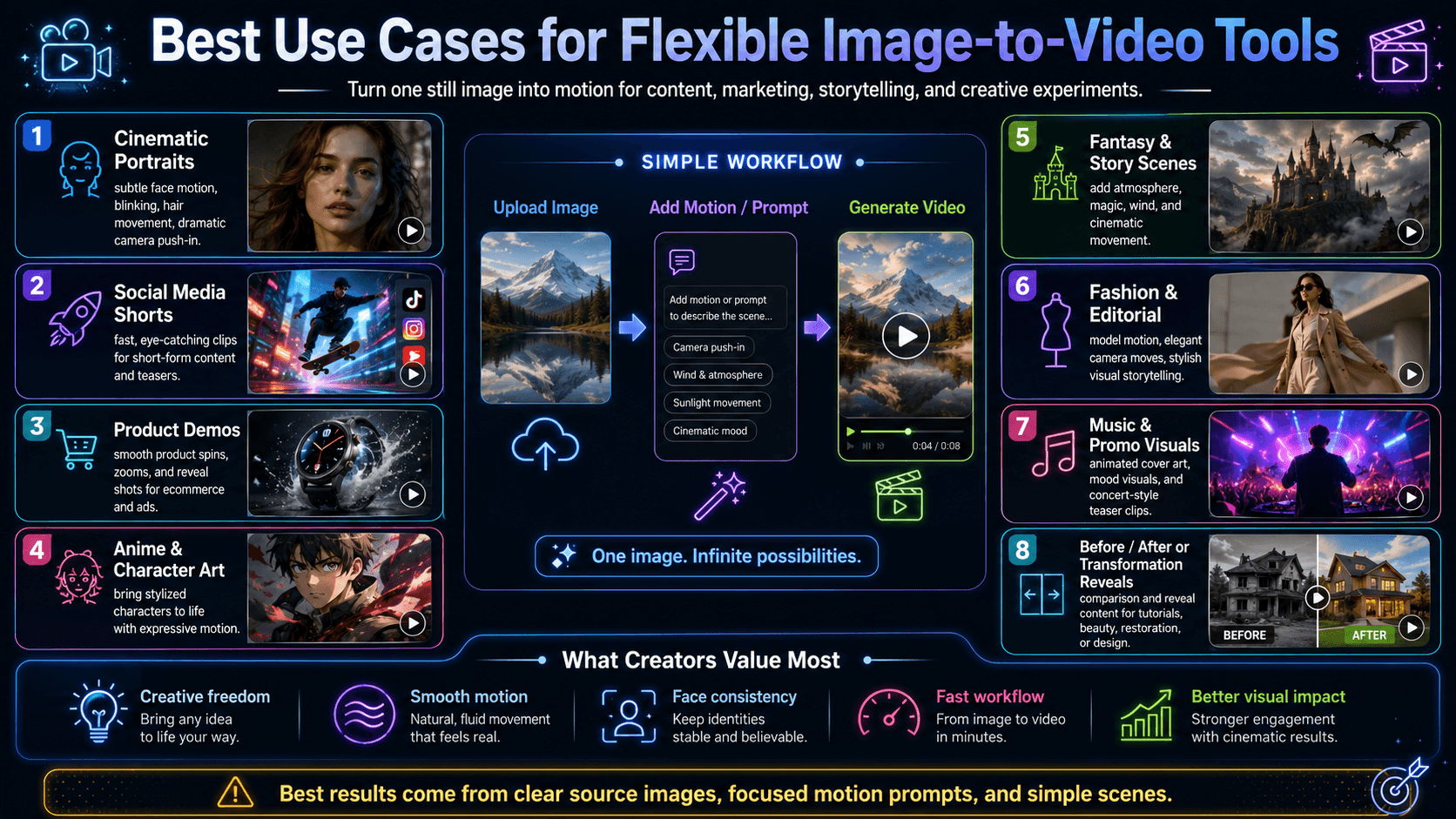
Best Use Cases for Creators
AI image-to-video tools are not just novelty generators. They are becoming practical creative instruments across many industries.
Content creators use them to turn static images into engaging short-form videos for platforms like TikTok, Instagram, and YouTube Shorts.
Digital artists animate their illustrations to bring emotion, depth, and movement into their work.
Marketers create product showcases without expensive production setups.
Educators convert diagrams and concepts into visual explanations that are easier to understand.
Storytellers use them to prototype scenes, build mood, and test visual narratives before full production.
Each use case shares one core idea: turning still imagination into motion storytelling.
How to Use No-Restriction Tools Responsibly
Even when tools feel “unrestricted,” responsible use remains important.
Creators should respect copyright and avoid using content they do not own or have permission to use. They should also avoid misleading or harmful outputs that could misrepresent real people or events.
Responsible use also means understanding the difference between creative experimentation and misuse. AI tools are powerful, but their impact depends on how they are used.
The best creators use freedom to explore ideas, not to cross ethical boundaries.
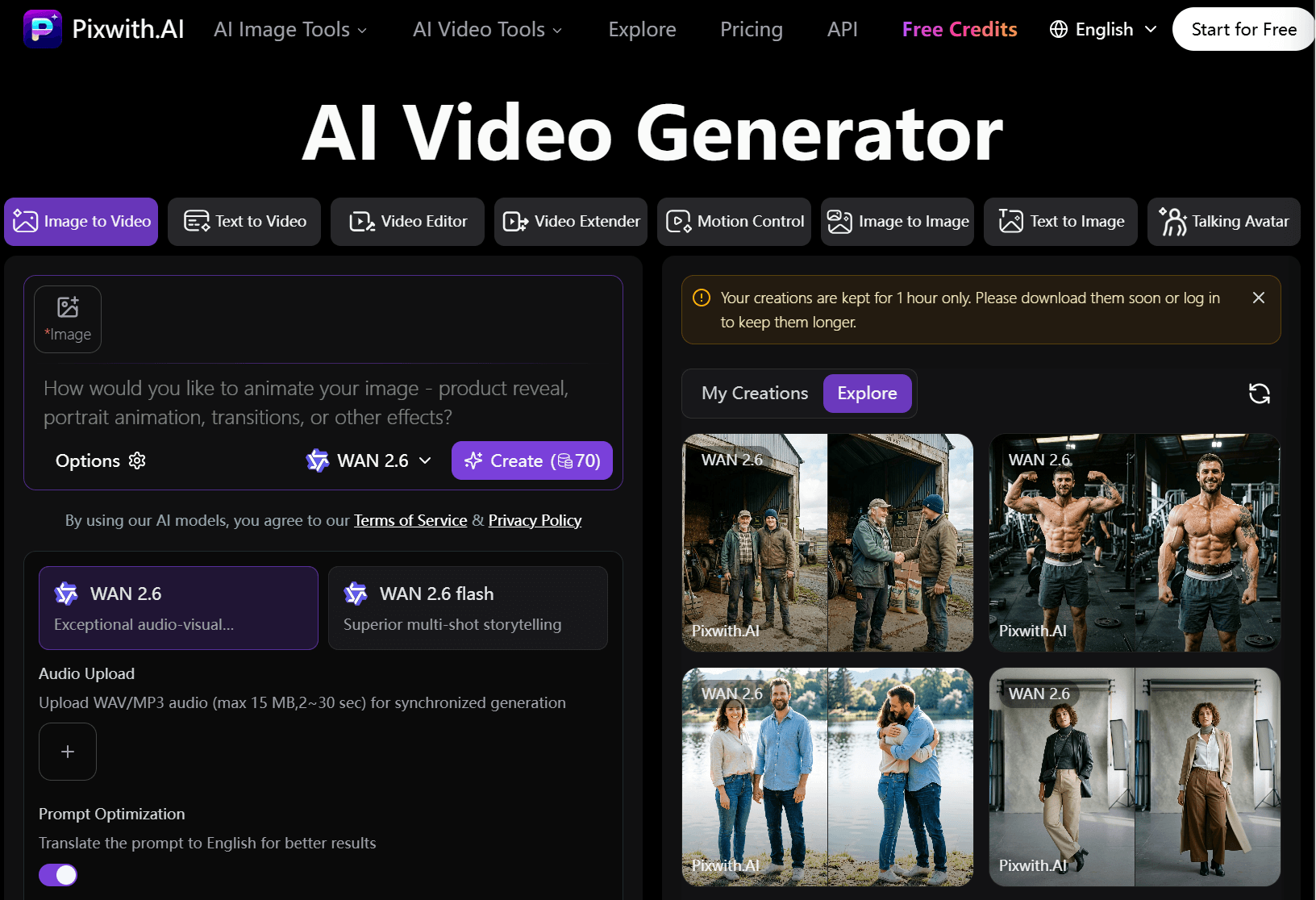
Why Pixwith Is Useful for Flexible Image-to-Video Creation
Platforms like Pixwith aim to simplify the creative process by reducing unnecessary friction between idea and output. Instead of forcing users through complex setups, they focus on quick transformation from image to motion.
Pixwith is particularly useful for creators who want flexible experimentation. It allows users to test visual ideas quickly, explore different animation styles, and iterate without heavy technical barriers.
For marketers, it supports fast production of visual content. For artists, it enables rapid animation of still work. For storytellers, it becomes a tool for visual prototyping.
The focus is not only on generation speed, but also on creative flow.
Pixwith focuses on reducing friction between imagination and output.
It offers:
- Flexible prompting for different creative styles
- A simple workflow that removes technical complexity
- Fast generation for quick iteration
- Multiple animation styles for experimentation
- Support for creative testing and prototyping
- Reduced barriers between idea and final video
Ideal Users
This type of tool is useful for a wide range of creators:
- Content creators who need fast social media videos
- Marketers producing promotional visuals
- Designers experimenting with motion concepts
- Educators creating visual explanations
- Hobbyists exploring creative animation
Each user benefits from the same core idea: turning still images into moving stories with minimal effort.
How to Get Better Results from AI Image-to-Video Generators
Getting good results is not only about the tool—it is also about how you guide it.
Start with high-quality images. A clear, well-lit subject gives the AI stronger visual information, reducing distortion and identity drift.
Use detailed motion prompts instead of vague instructions. Words like “slow cinematic push-in” or “gentle wind movement” produce more controlled results than simple commands.
Avoid overly complex actions. If too many movements happen at once, the model may struggle to maintain stability.
Generate multiple variations. AI output is not perfect on the first try, so exploring several versions often leads to better results.
Refine camera movements carefully. Simple directions like zoom, pan, or orbit tend to work more reliably than complicated transitions.
Test different animation styles to understand how the model behaves under various visual conditions.
Example Motion Prompts
Some simple but effective motion styles include:
- Cinematic camera push-in
- Gentle character movement
- Dynamic action sequence
- Product showcase rotation
These prompts work because they are clear, structured, and visually grounded.
Why Output Quality Matters More Than Unlimited Freedom
Unlimited freedom means little if the final video looks unstable or broken.
The best AI tools are not defined by how few restrictions they have, but by how well they perform under creative pressure.
A strong system balances:
- Flexibility for ideas
- Consistency in visuals
- Control over motion
- High visual quality
- Ease of use for creators
This balance is what turns AI from a toy into a professional tool.
What Professionals Look For
Professionals care less about “no restrictions” and more about reliability. They want tools that work the same way every time, without surprises.Stable Subjects That Do Not
Change Mid-Video
They need the same character to stay the same from start to finish. If a woman is wearing a red jacket in the first frame, it should not suddenly become blue halfway through the clip. The same goes for faces, hair, and body type.
Example: A product designer making a short ad for a watch expects the watch to keep the same size, color, and position on the model’s wrist. If the watch changes shape or color in the middle of the video, the whole ad has to be redone.
Realistic Motion That Feels Physically Correct
They want movements that look natural. Arms should swing the right way when a person walks. Water should splash and flow like real water. Hair should move with wind or head turns.
Example: A filmmaker creating a scene with a person running down stairs needs the feet to land on each step in the right order. If the feet skip steps or float above them, the scene will look fake and break the viewer’s focus.
Fast Generation Without Long Delays
They value speed because time costs money. Waiting twenty minutes for one short clip is not practical when they have to make ten or twenty versions in a day.
Example: An advertising team has only two hours to finish a social media post before a product launch. They need the AI to generate each test clip in under a minute so they can pick the best one and move on.
Consistent, Repeatable Results
They want to run the same prompt twice and get similar output. This lets them tweak one small thing, like camera angle, without everything else changing at the same time.
Example: A game studio testing character animations needs the same running cycle to look the same each time they generate it. They can then adjust only the arm swing or head tilt and know the rest of the body will stay the same.
Final Thought
“No restriction” in AI image-to-video tools is not about removing all boundaries. It is about reducing unnecessary barriers while still maintaining structure, safety, and technical reliability.
The real value for creators is not unlimited freedom alone. It is the ability to create smoothly, consistently, and confidently—without losing the quality of the story they are trying to tell.
Because in the end, every powerful video begins with a simple image… and a system capable of bringing it to life without breaking it along the way.