
AI image-to-video tools have made video creation easier than it used to be. Now, users can upload a still image, and the software will generate an animated clip. It will do this in a matter of seconds without the need for animation skills or editing software.
As a result, most creators are using these tools more than ever before to generate their personal images, private artwork, and even the things they are trying to conceptualize for their clients. However, the more people use these tools, the more they are concerned about the privacy of the software. Due to this, a lot of people have been looking for an AI image-to-video generator that is also private. They want to be able to generate videos and know that the things they upload won’t be used outside the context of their personal use.
Since most AI video systems rely on cloud-based processing, this means that the content that gets uploaded still has to go off to a server in order to generate. It may not be stored, but the uploaded images, videos that get generated, and the text prompts will probably be stored for some sort of analysis, or even possibly used to teach the program. For the average user, this may not matter to them, but for the professional creator, a lot more concern is warranted.
AI has become more useful, but it has become valuable to be sure that the uploaded text and images, and the generated content, are secure.
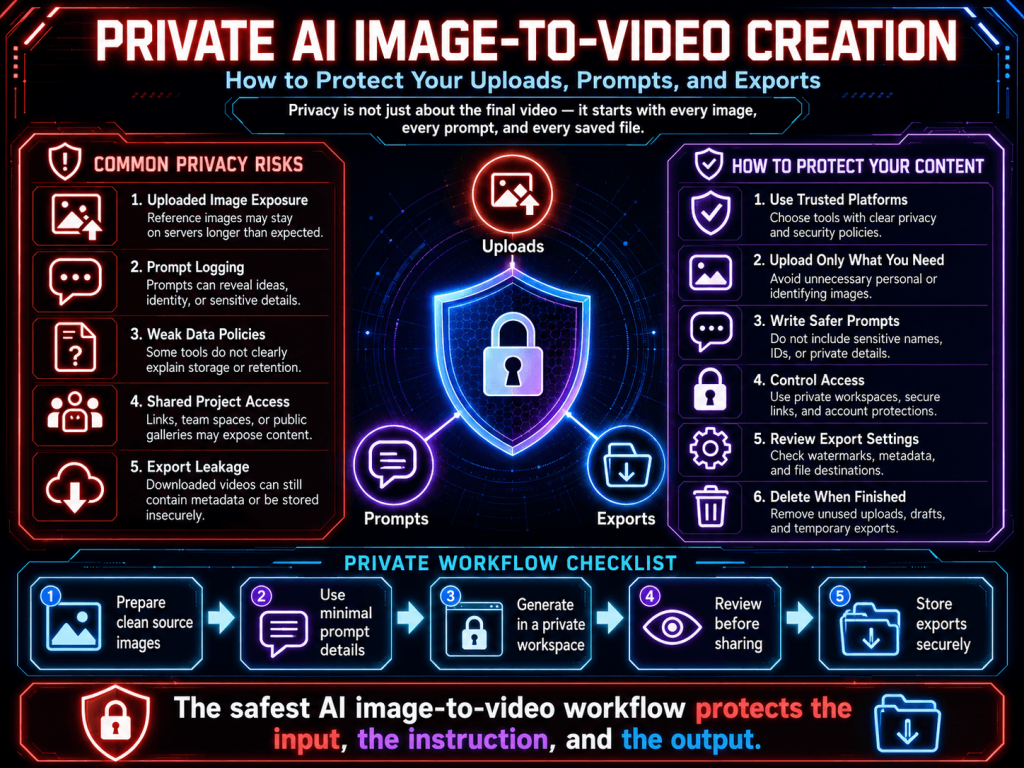
Why Privacy Matters More in AI Video Generation
Most people don’t realize how much input AI image-to-video systems need from a user to make videos. Image-to-video systems need:
- Uploaded images
- Written prompts
- Facial details
- Motion instructions
- Style references
- Generation history
- Account activity
This leads to a larger privacy footprint than simple image editing tools.
Most times, users usually send:
- Personal portraits
- Client visuals
- Prototype concepts
- Unfinished creative work
- Business-related content
- Artistic experiments
If systems don’t have specific practices aimed toward privacy, users have no way to know what happens to their images. This is the reason why privacy-sensitive tech becomes more and more crucial.
Not Every AI Platform Handles Data the Same Way
It is commonly believed that all AI video tools store and handle user data in the same way.
The truth is, they are very different. Some tools:
- Store user uploads for a couple of days.
- Keep a history of what users input.
- Keep the content to make their tools better.
- Keep track of how users behave.
- Force users to create accounts.
- Save the videos users create for them.
Others offer better data policies with shorter storage times, deletion options, or less data collection. The unfortunate truth is that most users do not check the tools’ policies before uploading sensitive content.
More often than not, users’ concern for their data happens when they begin to ask themselves the following questions:
- Are the images I uploaded still stored somewhere?
- Can the service use whatever I uploaded in the future?
- Is the content I entered still linked to my account?
- Can the content I uploaded be removed for good?
- Is my content used to enhance their AI tools?
The number of users asking these questions is on the rise.
Avoid Uploading Sensitive Identity Content
One of the best ways to protect your privacy is easy: don’t ever upload personal, sensitive information if you do not have to.
This personal, sensitive information includes:
- Government IDs
- Passports
- Banking documents
- Private medical records
- Confidential business files
- Highly personal family photos
It is always better to be safe than sorry when it comes to protecting your personal information, no matter how trustworthy you may think the platform is.
Privacy protection is not just about protecting your data. It means being mindful of other people’s privacy. You must upload photos with other people’s consent, and must not use photos of other people for misleading reasons.
As AI-generated media becomes more advanced, the potential for misuse also gets bigger. It is your responsibility to treat real-person content ethically.
Remove Metadata Before Uploading Images
Not many people know that pictures can contain concealed metadata.
Metadata can hold:
- Location information
- Device details
- Timestamps
- Camera information
- Editing history
Depending on how the picture was made, that info can still be stuck in the file even if it is not visible. Hence, before posting your own or important pictures online, it is smart to edit out the extra details. It adds privacy protection when putting up your own or your clients’ pictures. A lot of modern devices and editing tools give the option to remove the details before exporting.
Review Terms and Privacy Policies Carefully
Users mostly ignore the terms of service. This practice is getting increasingly unsafe with AI.
Privacy policies can state:
- Whether uploads are stored
- How long are files retained
- If prompts are logged
- whether content trains AI models
- What deletion options exist
- How user activity is monitored
The other problems arise from the absence of sufficient information and are not about the platforms themselves.
For instance, the developer may think that files that are sent for generation are discarded at once, but the platform may keep such files for review and system optimization.
By learning more about a platform’s practices, the user can choose the right platform to use for sharing their confidential and important work.
Store Important Files Locally
These days, more and more content-makers are recognizing the limits of artificial intelligence and prefer to utilize the technology as a content generation tool rather than a content repository. Rather than putting all their trust in a cloud-based system, users should consider:
- Keeping their original files on their computers
- Crossing the streams and saving their exports
- Developing their own personal filing systems for their prompts
- Keeping their projects in a physical format
By storing their work on local systems, creators feel they maintain a greater handle on their work. Especially for work that is:
- Business-related
- Uncompleted creative work
- Personal digital content
- Creative work that is new and different
The best approach is that the fewer storage systems there are, the more control the creator has over their work and the more their privacy is maintained.
Check Whether Content Can Be Deleted
Deletion options are arguably more important than most users understand. Some AI programs offer the ability to:
- Delete the history of prior generations
- Remove saved uploads
- Clear saved prompts
- Turn off system tracking for your account
A lot of other programs give very little control after you upload something. Before you start to use a specific AI image-to-video conversion program, check to see if:
- Are there any deletion options available
- What is the process for requesting deletions
- Are deleted files actually gone for good
- Are saved prompts deleted
Usually, a program that offers deletion options is one that has a greater regard for its users’ privacy.
Be Careful With Shared or Public Workspaces
Some AI systems include:
- Shared galleries
- Public generations
- Community feeds
- Searchable prompts
- Collaborative workspaces
They help people discover things and find inspiration. But they could also accidentally share your creative ideas. Try to steer clear of sharing sensitive ideas, materials for unreleased campaigns, sensitive client projects, and private prototypes in publicly accessible spaces until you know everything about the visibility settings. A private workflow should be private throughout the entire process.
Why Prompt Privacy Is Becoming More Important
Prompts are quickly becoming an important part of the creative process. They can contain:
- Storytelling concepts
- Visual direction
- Creative techniques
- Branding ideas
- Stylistic workflows
Some users are worried about image privacy, but they ignore that sharing prompts can be just as revealing. When prompts are permanently saved or viewable by others, users are forced to give up information about their private workflow that they would not want to be seen.
This is also why most experienced users now prefer systems that:
- Minimize prompt logging
- Avoid unnecessary tracking
- Provide clearer history controls
- Allow easier deletion management
Creativity involves more than just documents and files, and users want to be able to keep their creative processes private as well.
Responsible AI Use Still Matters
We focus on privacy to gain control, not to escape accountability. Just because your AI image-and-video creation tools use a “private” workflow, that doesn’t give you the excuse to create the following:
- Deceptive deepfakes
- Identity misuse
- Non-consensual synthetic media
- Misleading impersonation
- Exploitative content
Creating responsibly fosters trust in all AI. The intention of a private AI workflow is not to have an avenue for dubious and harmful behavior, but to allow creators to have more autonomy over the data, projects, and creativity that they control. When upholding ethics, privacy, and accountability coexist, rather than being at odds.
A Simple Privacy Checklist Before Uploading
Before you use an AI image-to-video platform, you should follow these steps:
- Don’t upload documents that can identify you
- If you have personal images, remove the metadata
- Check the site’s privacy policy
- Find out if they save your uploads
- Check if your prompts are logged
- Check if you have options for the request
- Keep important exports on your device
- Avoid doing confidential work in public
- Protect consent and identity
- Use sites that make privacy clear
These steps can help you protect your privacy from these apps.
What Users Should Look for in a Private AI Image-to-Video Generator
The more people realize how important their privacy is, the more it changes how people view AI tools. Now, many creators prefer tools that:
- Simpler workflows
- Fewer unnecessary barriers
- Clearer privacy practices
- Transparent deletion controls
- Minimal data collection
- Predictable system behavior
Trust is considered equally important to the quality of what is created. To have a great privacy experience, a platform does not need to say it is “anonymous.” What users want the most is simple privacy systems that have no unnecessary complexity.
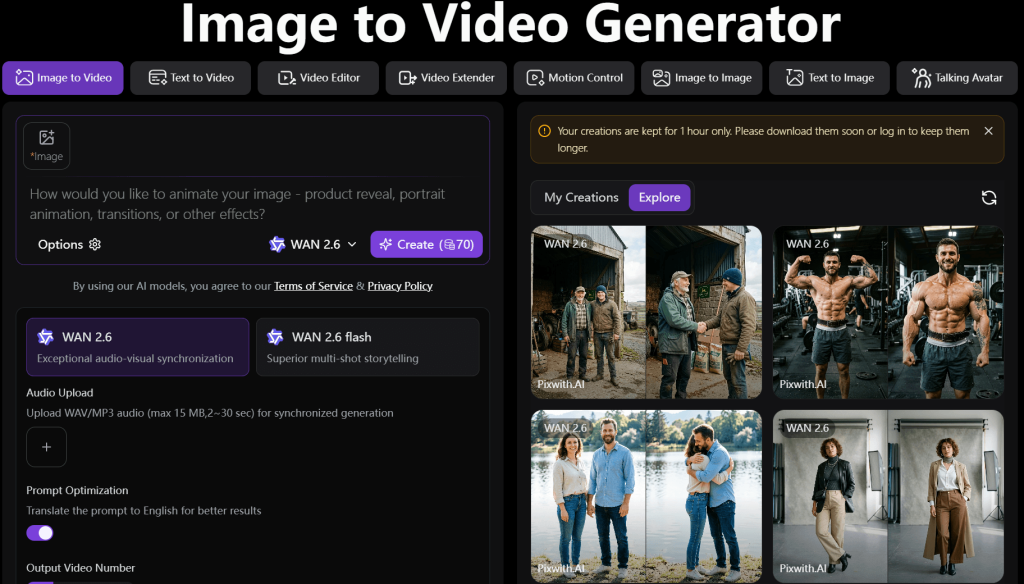
Where Privacy-Focused Workflows Like Pixwith Fit In
Some AI video tools prioritize layered systems, account complexity, and aggressive onboarding over building a simpler, more efficient user experience. This is where tools like Pixwith fit neatly into privacy-first, simplified, and frictionless creative processes.
Users prefer video generation tools because of the ability to create with simpler workflows with fewer interruptions and less unnecessary friction. The more users become aware of the way AI platforms manage uploads, prompts, and exports, the more the platforms become increasingly appealing. A rapid and efficient workflow fosters a greater sense of privacy and control over one’s creativity.
Conclusion
AI image-to-video technology is getting better, but so are privacy concerns. The way the data is managed determines if things like uploads, prompts, and even the history of what a user has generated can become part of a user’s digital footprint.
Because of this, a lot of creators are searching for more private AI image-to-video generators that allow for more transparent workflows and control.
It is possible to prioritize privacy without being paranoid. Keeping some level of AI in your life isn’t bad, but prioritizing a responsible online life and picking the right platforms means thinking about it a little more.
Pixwith is an AI image-to-video generator that is designed to prioritize privacy, meaning that uploads and prompts can be generated without unnecessary friction.