
In AI video generation, terms like “no restriction” and “no filter” are commonly used as labels. Some even think them interchangeable, because they both promise fewer limits, more freedom, and less friction between an idea and the final output. However, these terms point to very different capabilities and functionalities in AI image-to-video generation systems, and they determine the best generator for any workflow need.
What most creators really want is a smoother and more predictable creative process. Therefore, this article compares No-Restriction AI image to video generators with No-Filter AI video generators, their practical differences, and which concept better aligns with real-world use, whether the goal is storytelling, content production, or fast experimentation.
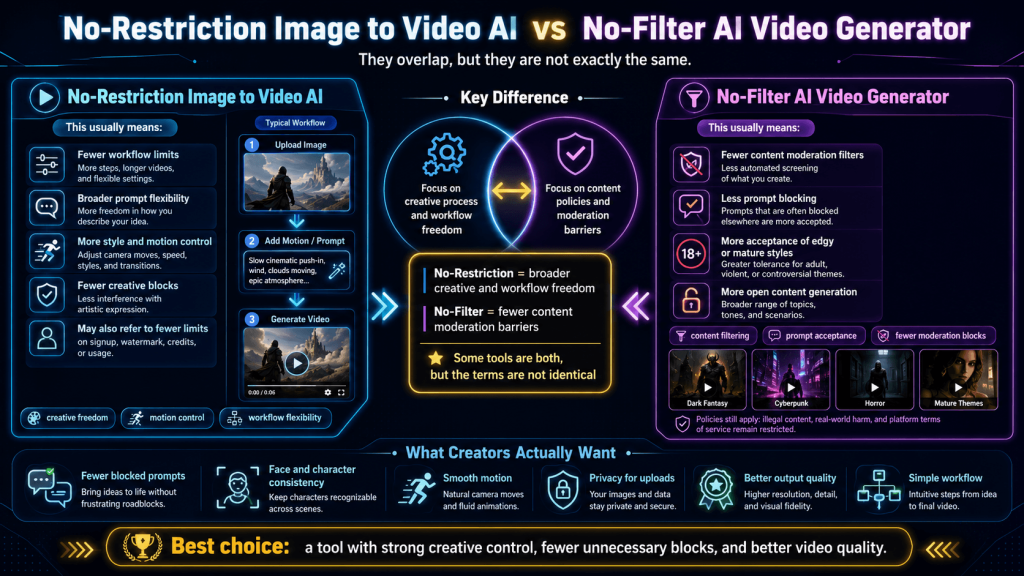
What “No Restriction” Really Means in Image-to-Video AI
“No restriction,” in AI image-to-video generation, reflects a deeper need for flexibility within the creative process, particularly in how freely a creator can guide the system to produce an intended result.
At its core, this concept is tied to workflow freedom, because many generators introduce constraints in subtle but impactful ways. These constraints may not always appear as outright blocks, but they still interfere with creative control and reduce the responsiveness of the AI.
A truly low-restriction workflow gives creators the ability to describe motion, camera angles, pacing, and visual tone without the system forcing those ideas into predefined templates. More so, the generator responds directly to the intent behind the prompt. This kind of flexibility is significant in image-to-video generation, where consistency between the source image and the resulting motion plays a major role in the overall quality.
In addition, a “no restriction” environment allows a wider range of visual expressions, from highly stylized and abstract to grounded and cinematic (i.e., it does not lock creators into a single aesthetic). It also enables faster iteration and reduces the need for repeated trial-and-error adjustments.
To put it simply, a No-Restriction image-to-video AI adapts to the creator’s intent, as opposed to generators that impose restrictions on creators.
What “No Filter” AI Video Generators Actually Refer To
Filters, in AI video generation, are systems that are designed to evaluate prompts and outputs, ensuring they meet certain safety, ethical, or platform guidelines — content moderation. These systems can block, modify, or entirely reject inputs that are flagged as sensitive, ambiguous, or potentially problematic.
A “no filter” AI video generator, therefore, is typically a generator where these moderation layers are reduced or less aggressive. Where prompts are less likely to be rewritten or rejected outright, and the system may allow a broader range of inputs to pass through without interruption.
However, this No-Filter AI freedom is all about content permissiveness, not how effectively that content is translated into a video. By implication, a generator may allow a wide range of prompts but still struggle with consistency, motion accuracy, or adherence to detailed instructions. In other words, fewer filters do not automatically translate into better creative control.
Even so, there is a glaring distinction in how these systems preserve prompt intent and the original idea when compared with heavy-filtering generators. Although this also places more responsibility on the user to ensure clarity, because the system will not correct obvious prompting errors either.
It is also worth noting that most No-Filter generators still maintain baseline protections (safeguards) to prevent clearly harmful or illegal use. However, the safeguards do not interfere with the creative process.
Overall, “no filter” is about content allowance. It addresses the question of what the system permits, but it does not necessarily improve how well the system executes a creator’s vision.
Key Differences: No Restriction vs. No Filter (Side-by-Side)
The terms “no restriction” and “no filter” are often used interchangeably; however, they differ in behaviour, priorities, and image-to-video workflows. Understanding that difference is key to choosing the right tool.
A No-Filter system is primarily concerned with content moderation. Its role is to decide whether a prompt is acceptable and should be processed without interference. However, a No-Restriction system offers control over the entire generation process to creators, from motion direction to stylistic choices to output consistency, everything.
In addition, generators with no filters are lenient with prompts and other inputs. But this leniency does not improve the capabilities of the No-Filter AI video generator, or the output quality and usability. In real use, generators with no workflow restrictions can improve productivity since they enable smoother iteration, better alignment with creative intent, and more predictable results across multiple generations. Not only that, but they also reduce project completion times for creators.
In terms of user benefit, No-Filter AI video generators appeal to users who want fewer interruptions at the early AI video generation stages because they save them from the frustration of blocked or altered inputs. A No-Restriction image-to-video generator, however, improves the entire creative process by enabling creators to shape the system’s outcome more precisely.
Nevertheless, some platforms still attempt to balance both by offering moderate content leniency alongside flexible workflows.
The key takeaway is that the concepts solve entirely different problems. “No filter” addresses whether a prompt can be used (i.e., permission), while “no restriction” determines how effectively that prompt can be turned into a usable video (i.e., execution).
Which One Matters More for Image-to-Video Creators?
When the two concepts are placed side by side in real creative workflows, the difference in importance becomes much clearer.
In practical use, image-to-video creation is rarely about a single successful prompt. It is a repeatable process of refining motion, adjusting style, and maintaining visual consistency across many generation attempts. And this is where “no restriction” becomes significantly more valuable. A workflow that allows precise control over how an image is animated (i.e., how the camera moves, how subjects behave, and how the overall scene evolves) directly impacts the quality and usability of the final result.
By comparison, “no filter” plays a more limited role. It can reduce the frustration of blocked prompts, but once that initial hurdle is cleared, it has little influence over the actual generation process. More so, if the No-Filter generator lacks control mechanisms or produces inconsistent outputs, creators may still spend considerable time repeating generations to achieve something usable — inefficiency.
For most professional and everyday use cases (e.g., social media content, branded visuals, or storytelling), consistency and predictability are far more important than unrestricted input. Creators should be able to rely on the system to interpret their prompts accurately and produce outputs that align with a specific vision.
Even so, a streamlined process, speed, control, quality, repeatability, and ease of refinement are the deciding factors in image-to-video generation. And naturally, workflow freedom will always outweigh content/input leniency in those aspects.
Overall, “no restriction” is more important in day-to-day creation because it supports the entire lifecycle of a project, from initial idea to final output, whereas “no filter” mainly affects the starting point.
How to Choose the Right Tool Based on Your Use Case
Choosing between a “no restriction” image-to-video AI and a “no filter” video generator ultimately comes down to how the tool fits into a creator’s actual workflow.
For creators who are focused on storytelling, branding, or any form of structured visual content, workflow flexibility is usually their priority. In these scenarios, the ability to guide motion, maintain a consistent style, and produce predictable results across multiple generations is far more valuable than simply having unrestricted prompt access. More so, a generator that offers that degree of precision and also delivers stable outputs is exclusively for creators who are working on sequences or repeatable formats because it will save time and reduce frustration.
Similarly, there are also use cases where no filtering is very relevant. Therefore, experimental creators, researchers, or users exploring unconventional concepts and themes will benefit from generators that impose fewer limitations at the input stage. And since the goal is often exploration (i.e., more of experimenting and less about consistency), the system’s capability of testing a wide range of ideas without prompt interference can be considered a huge advantage.
For everyday content creation (e.g., social media clips, short-form videos, or quick graphic assets), where speed, ease of use, and consistency are the defining factors, creators are better off with No-Restriction AI image-to-video generators. They offer a streamlined process, they are fast, and they produce usable results without extensive tweaking or repeated attempts.
Taken together, the “right” tool is one that does not limit the creative process.
Final Verdict: Are They the Same?
From a practical and workflow-driven perspective, No-Restriction image-to-video AI and No-Filter AI video generators are not the same.
“No filter” primarily relates to content moderation, and its value lies in reducing friction at the input stage. This allows creators to experiment more freely and without interruption; however, its influence largely ends there.
“No restriction” offers control over the entire creative process, from motion to style to structure to output consistency. “No restriction” also has a direct impact on productivity, efficiency, and the overall quality of the animated video.
The bottom line is: the most effective AI video generators do not interfere with creativity and efficiency, yet they maintain enough structure/safeguards to ensure quality, stability, safety, and responsible use.