
AI video creation becomes costly without having a streamlined process. Creators often waste credits by producing overly long clips, making frequent edits to the prompts, and trying various AI video-generating tools. The more efficient and smarter solution is creating a system in which you can get the same repeatable outputs while spending fewer credits.
What this guide aims to do is to provide adult creators with a practical, credit-efficient AI video generator workflow. The focus will be on quality and consistency of the workflow as opposed to the random variability seen in other workflows.
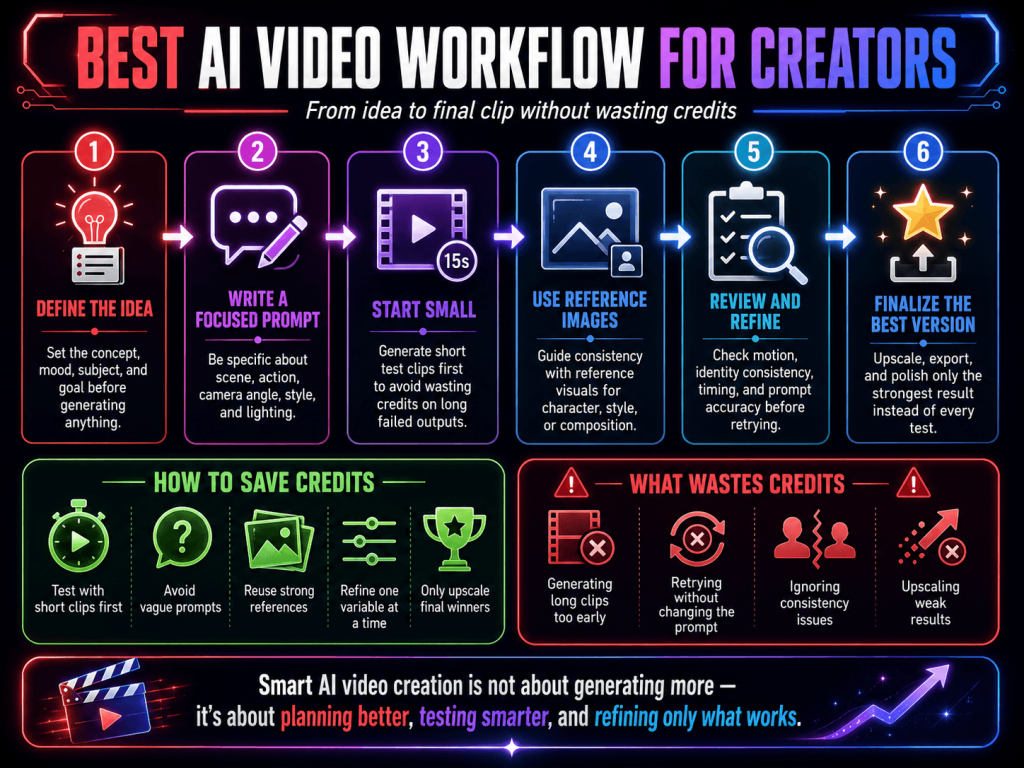
Define the Concept Before Utilization
Arguably the biggest mistake in the video generation process is creating the generation before the scene is determined. AI requires prompts with more specificity in terms of direction.
When considering what to create, think about the specifications of the:
- Character Style
- Camera Angle
- Lighting
- The Overall Mood
- Type of Motion
- The Environmental Setup of the Scene
- Overall Length of the Clip
- Details of the Costume
Having a more defined concept reduces the number of wasted generations.
Take, for instance, a prompt like, “elaborate cyberpunk nightclub setup with a slow, cinematic camera movement, with lighting in the form of neon.” This gives a model much more structure than a vague prompt containing no visual direction.
Efficient planning is pivotal for a more repeatable system when utilizing an AI video generator. There is less random variability and high performance consistency.
Create the Reference Image First
Almost all of the most successful creators begin a video generation process by first creating a reference image. They use this reference image to anchor the process of video generation for later steps. This reference usually serves a very deliberate purpose.
What to strive for when designing the reference image:
- Clear Facial Features
- Balanced Lighting
- An Observable Body Position
- Minimal Background Collusion
- A Strongly Defined Scene
Avoid cluttered images of low quality, missing body parts, or extreme poses.
These often create unpredictable movements and irregular anatomy while animating. Having a small collection of reusable reference images can save a lot of time. Many creatives sort their folders by:
- Different character versions
- Different hairstyles
- Different lighting options
- Different outfit variations
- Different facial expressions
This helps create future projects because the visual identity will already be established.
Base on Image-to-Video than Text-to-Video
Utilizing image-to-video rather than depending only on text prompts is one of the best options to maintain consistency.
In an image-to-video generation , you will get to figure out:
- Facial features
- Lighting
- Character dimensions
- Composition
- Colors
Due to this, there will be fewer problems with facial drift, warped anatomy, and unexpected clothing changes.
This is the reason image-to-video is a primary component of most professional NSFW AI video workflow production.
The method is straightforward:
- Make or edit a reference image
- Upload it to an image-to-video model
- Insert controlled motion
- Produce the motion in the form of a video with a series of short clips
This method allows for more flexibility in the production of the images.
Try Short Clips to Test Motion Before Making Long Clips
Testing a series of short clips is the best way to avoid losing credits when generating long clips.
A range of 3 to 5 seconds is usually enough time to test the short clips and to see:
- Facial features
- Movement of the camera
- The quality of the movements in the clip
- Direction of the eyes
- The movement of the hair
- The stability of the character
Small changes to the movement can drastically change the realism of the clip.
It is common to see professional creators test a series of short clips, all of which are very similar and have slight variations to the movement, before selecting the most appealing motion. Once the best clip has been selected, they will generate that clip in a larger size so that it is more prominent.
This process significantly cuts down on the expenses associated with rendering.
Refine and Upscale the Best Outputs
There is no need to refine every output
From the various short clips that you generate, select the best and only refine that output. This will optimize your workflow and prevent the unnecessary consumption of credits on poor generations.
At this level, creators usually:
- Refine for higher resolution
- Improve frame quality
- Remove blemishes
- Alter and adjust color grading
- Add lights
- Modify the transitions
Edit selectively, as this is more time efficient and easier, as opposed to generating more clips and editing to perfection each and every one of them.
Keep an Efficient System in Place
Your best friend when working with AIVD is record-keeping.
If you generate an amazing clip but forget to take note of:
- The prompt
- Seed values
- Motion settings
- Model version
- Strength controls
- Camera instructions
You might have a very hard time generating the same quality of output again.
Successful creators build repeatable systems by keeping detailed records of what works and what fails. With the proper record keeping, you can establish the first version to build on for each subsequent version.
Stay Within Platform and Compliance Rules
Production of AI video workflow for adult creators brings on a myriad of constraints depending on what platforms you publish on.
This applies to:
- Publishing explicit content
- Disclosure of AI content
- Using deepfakes
- Using likenesses that invoke consent
- Failing to obtain consent
Creators should avoid:
- Real-world impersonations
- Non-consensual likenesses
- The use of underage characters
- Use likenesses of copyrighted celebrities
Using appropriate patterns from the start protects your content and accounts.
Final Thoughts
You’re unlikely to achieve great results using random prompts. The strongest results will come from an organized method that values consistency, testing, and controlled generation.
An effective AI video generator workflow offers the following to creators:
- Credit savings
- Improved consistency in visual elements
- Faster clip creation and better output
- Fewer failed generations
- Production scaling
Rather, the goal is to think of AI video editing as a consistent and repeatable method of production instead of just randomly guessing.
Check out Pixwith.ai today for a more repeatable and controlled AI video editing workflow!!..