
A side-by-side look at why image-to-video tends to hold motion together better than text-to-video, and when the gap actually matters.
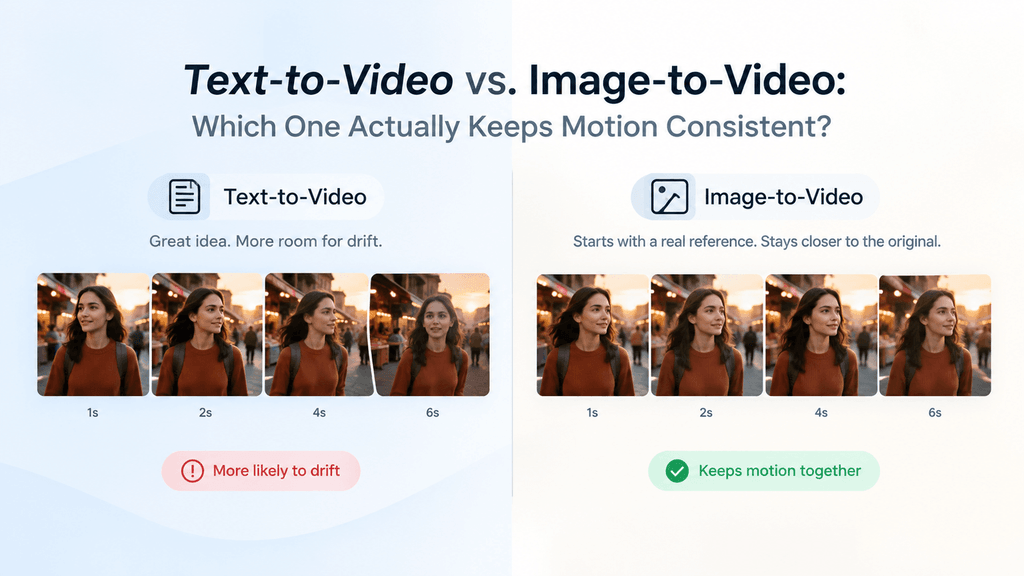
Ask anyone who’s spent a weekend testing an AI video tool and you’ll hear some version of the same complaint: the first frame looks great, and by frame sixty the subject’s face has drifted, an arm has bent the wrong way, or the background has quietly swapped itself out. That’s a motion consistency problem, and it shows up far more in text-to-video than in image-to-video — for reasons that have less to do with which tool you’re using and more to do with how each method starts.
It’s also one of the most common sources of frustration for anyone producing content on any kind of deadline. A clip that looks perfect at the two-second mark and falls apart by the six-second mark isn’t usable, and re-rendering five or six times to get a clean take eats into whatever time was saved by using an AI tool in the first place. Understanding why the drift happens — and which method is less prone to it — saves a lot of that wasted iteration.
Pixwith supports both, which makes it a decent place to actually compare the two rather than take either claim on faith. Here’s what tends to hold up and what tends to fall apart, and why.
Two Very Different Starting Points
Text-to-video starts from nothing but a sentence. Type “a woman walking through a market at sunset, camera tracking alongside her,” and the model has to invent everything at once — her face, her clothing, the stalls around her, the light, and then hold all of that steady while also generating movement frame by frame. It’s solving several problems at the same time, and consistency is the one most likely to slip.
Image-to-video skips most of that guesswork. You hand it a photo, and the model already knows exactly what the subject looks like, what she’s wearing, where the light is falling. Its real job is figuring out how that scene moves — a narrower, more constrained problem than inventing a scene and animating it in the same breath.
Why Faces and Hands Break First
If you’re going to see drift anywhere, it’s almost always in faces and hands. Both are high-detail, high-variance regions — a face has to stay recognizable across dozens of frames while also shifting expression and angle, and hands have enough joints and overlapping shapes that even small errors compound fast.
In text-to-video, a face invented purely from a prompt has no fixed reference to anchor to, so by the middle of a clip it can subtly reshape — a jawline widening, eye spacing shifting a fraction. Image-to-video starts with a real face already locked in place, and the model’s task becomes keeping that fixed reference intact through the motion rather than reconstructing it from scratch each frame. That’s a meaningfully easier problem, and it shows in the output.
Hands are their own special case, and worth calling out separately, because they trip up nearly every video generation method regardless of starting point. A hand has multiple joints that can each bend several different ways, and the model has to keep track of all of them consistently while also generating whatever motion the hand is performing — reaching, waving, holding something. Image-to-video still has an edge here, since it at least starts from a correct hand shape, but it’s the one area where even a strong starting image doesn’t fully eliminate the risk of drift, particularly in longer clips or fast gestures.
Backgrounds Are the Quiet Failure Point
Faces get the attention because they’re what people notice first, but backgrounds fail just as often, sometimes worse. A text-to-video prompt describing a busy street with shops and pedestrians gives the model enormous freedom to fill in details, and different frames can fill them in slightly differently — a sign that changes color, a building that gains a window it didn’t have three frames earlier.
With an uploaded image, the background is fixed data from the start. The model isn’t inventing the shopfronts; it’s trying to keep them steady while the camera or subject moves past them. Errors still happen, particularly at the edges of frame or behind fast-moving objects, but they’re corrections to something real rather than fresh inventions each time.
Where Text-to-Video Actually Wins
None of this makes image-to-video the better choice across the board. Text-to-video has one clear advantage: it isn’t limited by what you can photograph or already have on hand. Want a dragon flying over a city that doesn’t exist, or a scene styled after a specific art movement? There’s no source image for that, so text-to-video is the only entry point available — and for short, stylized, or fantastical clips, the consistency gap matters less, since there’s no real-world reference the viewer is measuring the output against.
It’s also faster to iterate with. Testing five variations of a concept by rewriting a prompt takes less setup than sourcing or generating five different starting images. For early-stage concept testing, where the point is exploring direction rather than producing a final clip, that speed usually outweighs the consistency cost.
Motion Complexity Changes the Calculation
The type of motion you’re asking for matters as much as the starting point. Simple, single-direction movement — a slow pan, a gentle zoom, a subject walking in a straight line — holds together reasonably well in both methods, because there’s less for the model to reconcile between frames.
Complex motion is where the gap widens. Multiple moving elements, a camera angle that shifts mid-clip, or a subject interacting with objects all multiply the number of things that can drift out of sync. Image-to-video handles this better simply because it’s only solving the motion half of the problem. Ask for the same complexity from text-to-video, and you’re stacking that difficulty on top of the model still working out what the scene even looks like.
What Pixwith’s Camera and Motion Controls Change
This is where the platform-level controls start to matter, not just the raw generation method. Pixwith’s motion presets — smooth, normal, performance — and its camera controls for pan, zoom, and tracking shots give you a way to constrain the problem regardless of which entry point you’re using. Naming an exact camera move rather than leaving it to the model’s interpretation of a vague prompt narrows the range of plausible outputs, which tends to reduce drift in both text-to-video and image-to-video alike.
The real-time mode changes this equation further. Because you’re steering a scene as it evolves rather than generating a fixed clip and hoping it holds together, you can catch drift the moment it starts and nudge the scene back before it compounds. That’s a meaningfully different way of managing consistency than reviewing a finished eight-second render and deciding whether to regenerate the whole thing.
What’s Actually Happening Frame to Frame
It helps to understand roughly what’s going on under the hood, without getting too deep into the mechanics. Video generation models don’t render a scene once and then simply move a camera through it — they generate each frame in relation to the ones around it, predicting how the previous frame should evolve into the next. Every frame carries forward some uncertainty from the one before it, and that uncertainty compounds the longer the clip runs.
With text-to-video, that uncertainty starts high, because the very first frame is itself a guess built from a written description rather than a fixed reference. Each subsequent frame is drifting from an already-uncertain starting point. With image-to-video, the first frame is locked to something concrete, so even though the same frame-to-frame uncertainty still applies, it’s compounding from a stable anchor instead of a moving target. That’s really the whole difference in one sentence — both methods face the same compounding problem, but they start it from very different places.
This is also why longer clips make the gap more visible. A three-second render often looks similar regardless of method, because there simply isn’t enough time for drift to accumulate into something noticeable. Push past six or seven seconds, or use Extend to stitch several segments together, and the accumulated uncertainty in text-to-video starts to show in ways it usually doesn’t in a short clip.
A Practical Way to Choose
If the project depends on a specific person, product, or location looking right throughout the clip — a product demo, a portrait animation, anything built around a real subject — image-to-video is the safer starting point almost every time. The consistency advantage is largest exactly where consistency matters most.
If the project is more about mood, concept, or something that doesn’t exist as a photograph — a stylized world, an abstract idea, a quick visual sketch — text-to-video’s flexibility usually outweighs its consistency gap, especially early on, while you’re still figuring out a direction.
A workflow a lot of people land on after testing both: generate or source a still image first, refine it until the subject and composition look right, then bring that into image-to-video for the actual motion. It borrows text-to-video’s flexibility for getting the starting point right and image-to-video’s stability for the part that actually needs to hold together.
Testing It Yourself Before Committing to a Workflow
The clearest way to see this difference isn’t reading about it — it’s running the same concept through both methods and watching what happens by the last few frames. Pick a subject with a face or a hand in frame, write a prompt with moderate camera movement, and generate it both ways. The gap tends to show up clearly by the second half of the clip.
It’s also worth testing at the complexity level you’ll actually be working at, not the simplest possible version. A slow pan across a still landscape won’t reveal much, since both methods handle that reasonably well. A scene with a moving subject and a moving camera shows the real difference far more clearly, and it’s a better predictor of how either method holds up on the kind of project you’re actually planning to make.
Quick Takeaway
For anything built around a real subject that needs to stay recognizable, start with image-to-video. For concepts, styles, or scenes with no photographic reference, text-to-video’s flexibility is worth the consistency trade-off — just expect more retakes.