
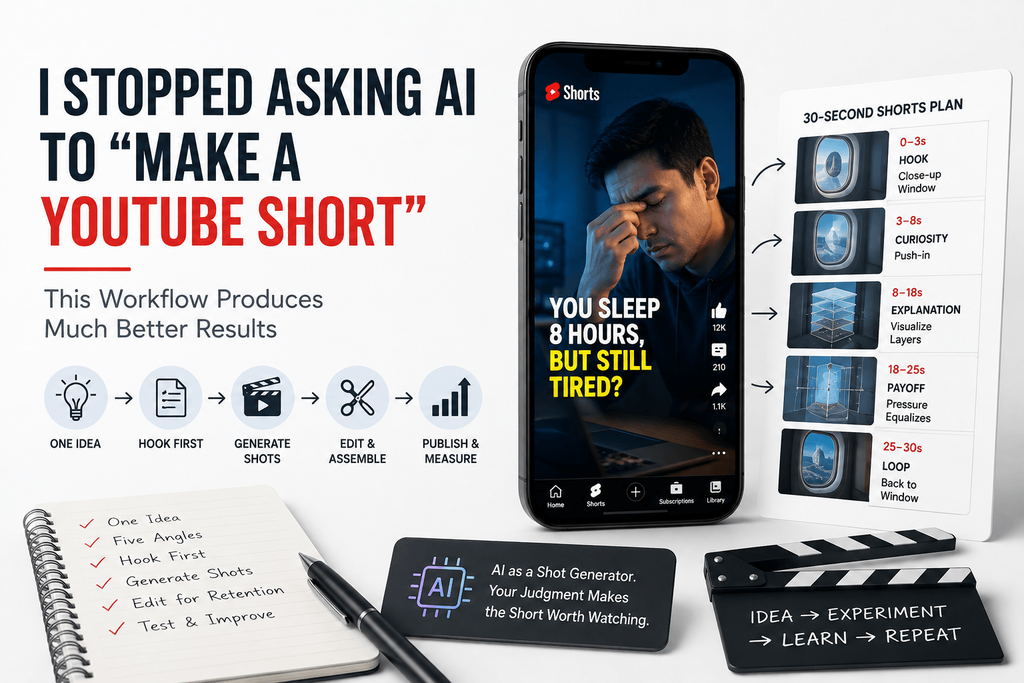
I originally thought AI would simplify Shorts production by letting me type one prompt and get a finished video back. After testing that a dozen times over, I ran into the opposite problem. Generating a video was easy. Generating something I’d actually publish was much harder.
That gap is the whole story here. AI has made video production cheap. Attention is still expensive.
Most AI Shorts tutorials focus on generating scripts, picking a voice, adding captions, converting to 9:16, and auto-publishing on a schedule. All useful. None of it answers the only question that actually decides whether a Short works: why would someone stop scrolling?
What I Learned After Treating AI Shorts Like Experiments
More generations didn’t automatically produce better Shorts. Left without a hypothesis, I just generated more mediocre footage, faster. Volume isn’t the fix.
The opening shot mattered more than visual complexity. “Create a cinematic video about morning productivity” gives the model almost nothing to hold onto. “Extreme close-up of a hand hitting snooze on a phone alarm at 6:03 AM, quick handheld movement, dim bedroom light” gives it something concrete — and it shows in the output. Specific beats broad, every time.
Consistency mattered more than isolated beautiful shots. A gorgeous five-second clip can still tank a Short if it doesn’t logically follow the scene before it. One stunning generation surrounded by disconnected ones just reads as a highlight reel with no through-line.
AI works best as a shot generator, not a substitute for editorial judgment. This is the idea everything else in this piece is built around. The model can hand you raw material. Deciding what belongs in the final thirty seconds is still your job.
The One-Idea, Five-Short Test
Here’s the framework I keep coming back to. Instead of turning one idea into one video, I turn it into five different angles, generate a hook for each, produce a few visual candidates per hook, and keep whichever one or two are actually worth publishing.
Take the topic “why you feel tired after eight hours of sleep.” Five different Shorts come out of that one line:
Version 1 — Curiosity. “You slept eight hours. So why are you still exhausted?”
Version 2 — Contrarian. “Eight hours of sleep doesn’t guarantee good sleep.”
Version 3 — Visual surprise. Open on someone waking up looking wrecked despite a clock clearly reading eight hours.
Version 4 — List format. “3 reasons eight hours of sleep still leaves you tired.”
Version 5 — Mini story. “I started tracking why I was tired every morning. One pattern kept appearing.”
Same underlying fact, five completely different entry points. You don’t know in advance which one earns the watch — that’s exactly why you make more than one.
Build the Hook Before You Generate the Video
The mistake I made early on was generating footage first and figuring out the hook afterward. It works better reversed: audience problem, then hook, then the first-frame idea, then supporting scenes, and only then generation.
Step 1 — Write the promise. What will the viewer know, feel, or discover by the end.
Step 2 — Create the first-frame idea. Would this image make sense even before anyone hears the narration? If not, it’s not doing its job.
Step 3 — Write only the first three to five seconds. Not the whole script. Just the opening.
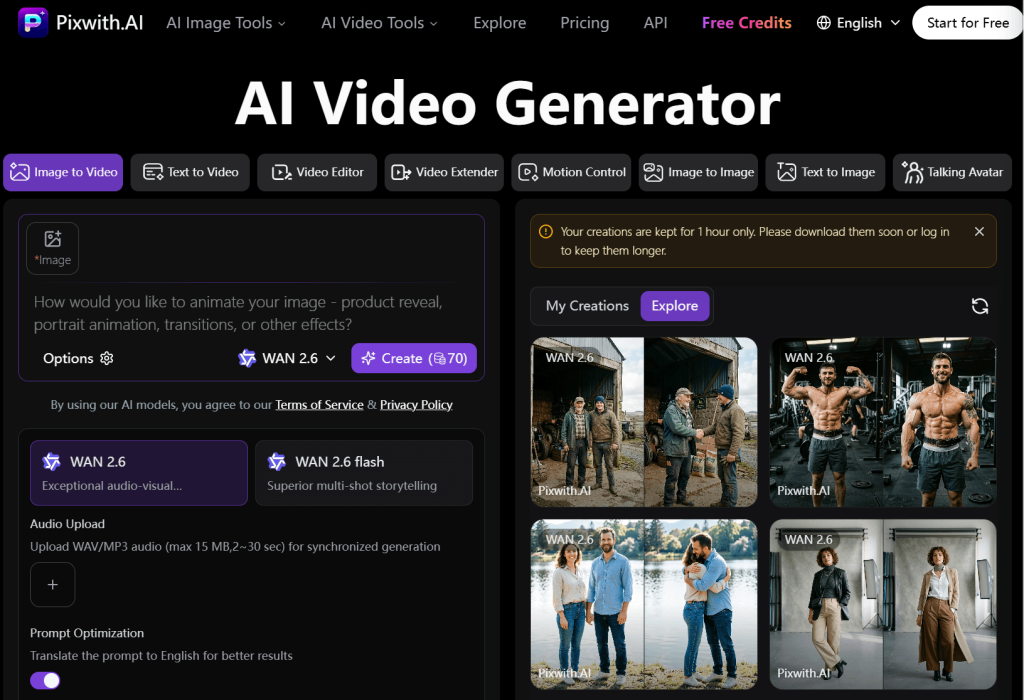
Step 4 — Generate several opening shots. This is the point where I actually open a generator. Instead of committing to a full Short up front, I use an AI video tool like Pixwith to produce a few possible opening shots first. Once one feels strong enough to stop a scroll, I build everything else around it.
How I Use Pixwith for the Visual Building Blocks
I’ve come to think of Pixwith less as an automatic Shorts button and more as a flexible production environment for raw clips.
Text-to-video, when the concept doesn’t exist yet.
This is what I reach for on imaginary situations, cinematic hooks, metaphorical scenes, establishing shots, and anything that leans on storytelling rather than a real subject.
Image-to-video, when consistency matters.
If I already have a character, product photography, artwork, or a thumbnail I need to stay on-model, starting from an image keeps things anchored.
Generate clips individually, not the whole Short in one blind attempt.
My actual workflow is scene one, review, scene two, review, scene three — not one long prompt covering the entire thirty seconds and hoping it holds together. A lot of competing tools push one-click, end-to-end generation as the selling point. I’ve found the opposite is true for anything meant to be published: more control over each individual clip produces a better finished Short than one long automatic generation ever does.
My Short-Form Prompt Formula
A structure I reuse constantly:
Subject + Action + Environment + Camera + Lighting + Motion + Constraint
For example: “A tired remote worker sits at a kitchen table at 6:30 AM, rubbing his eyes while staring at a laptop. Slow camera push-in, natural blue morning light, subtle handheld movement, realistic apartment, vertical framing, no text.”

Breaking that down — Subject is who or what the viewer should be focused on. Action is what visibly happens on screen. Environment is where it’s happening. Camera covers close-up, tracking shot, locked-off, push-in, orbit — pick one. Lighting might be morning light, fluorescent office lighting, sunset, or product studio lighting. Motion should stay specific and limited, not a laundry list of things happening at once. Constraint is where you rule things out — no text, stable background, vertical composition, consistent clothing.
Generate Shots for Editing, Not Finished Movies
A Short doesn’t need one continuous thirty-to-sixty-second AI generation to work. I build small assets instead — a two-second pattern interrupt, a three-second reaction, a four-second demonstration, a close-up, a wide shot, a product shot, a transition, an ending loop — and assemble them around the narration afterward.
One rule I follow consistently: one clip should communicate one visual idea. Cramming five actions into a single generation just makes the result less predictable and harder to control.
A Realistic 30-Second AI Shorts Workflow
Here’s an actual breakdown, not a generic template, using the topic “why airplane windows have tiny holes.”
0–3 seconds — Hook. Extreme close-up of an airplane window. Narration: “See that tiny hole in an airplane window?”
3–8 seconds — Curiosity. Camera pushes toward the hole. “It’s not damage. It’s there deliberately.”
8–18 seconds — Explanation. A simple visualization of the window’s layers and how pressure moves through them.
18–25 seconds — Payoff. A visual of pressure equalizing across the layers.
25–30 seconds — Loop. Back to the original window shot. “So next time you’re sitting beside one…”
I’d generate the window close-up, the push-in, and the layer visualization with Pixwith, then handle voice, captions, and sound effects in editing afterward. That split — AI for the visuals, editing for everything that ties them together — is closer to how this actually works than any workflow that pretends AI should handle every step.
The 3-Version Rule I Use Before Publishing
For any scene that matters, I generate three versions before picking one.
Version A, Safe. The literal interpretation of the prompt.
Version B, Cinematic. More deliberate lighting and camera movement.
Version C, Unexpected. A different perspective, a visual metaphor, or unusual framing.
On the topic of phone addiction, the safe version is someone scrolling on a couch. The cinematic version is blue phone light lighting up someone’s face in a dark bedroom. The unexpected version is endless smartphone screens reflected in someone’s eyes. All three are valid starting points — you just don’t know which one lands until you compare them side by side.
Where Free AI Video Generation Helps Most — and Where It Doesn’t
It’s worth being honest about the edges here.
AI is genuinely strong for establishing shots, impossible scenes, conceptual B-roll, product visualization, miniature stories, animation, transformations, historical or fantasy visuals, and anonymous storytelling where no specific real person needs to appear.
It’s weaker when you need exact factual footage, when the same person has to stay visually consistent across many scenes, when text inside the generated footage needs to be exact, when a physical process has to be scientifically precise, or when you need actual news footage of a real event.
A guide is more useful when it says where a tool falls short, not just where it shines.
“Free” Isn’t the Metric I Use to Judge an AI Shorts Generator
Most ranking pages lead with free credits, no watermark, and pricing tiers. I’ve stopped caring about that as the primary metric. What actually matters is publishable output per attempt.
| Workflow | Generations | Clips I’d Publish |
| Random prompts | 20 | 3 |
| Structured prompts | 12 | 6 |
| Hook-first workflow | 8 | 5 |
A free generator isn’t actually efficient if it takes forty generations to land one usable scene. The workflow you follow matters more than what the tool costs.
The Five Things I Check Before Keeping an AI Clip
Scroll stop. Would the first frame actually catch attention on its own.
Visual clarity. Can a viewer tell what they’re looking at instantly, with no explanation.
Motion. Does something meaningful actually happen in the shot.
Continuity. Would this clip connect naturally to the one after it.
Artifact check. Distorted hands, objects that shift between frames, unstable faces, warped backgrounds, accidental text, or motion that’s physically impossible — any of these and the clip gets cut.
I just call it the five-point publishability check. Nothing fancier needed.
One Prompt vs. a Prompt Sequence
The common approach looks like this: “Make a 30-second motivational YouTube Short about working hard.” That single line hands almost every creative decision to the model, which means you get whatever it decides to give you.
A prompt sequence looks different. Clip one: someone sitting alone at a desk at midnight. Clip two: a close-up of a notebook full of crossed-out ideas. Clip three: morning light entering the room while the person keeps working. Clip four: a phone lighting up with the first customer notification.
Four deliberate clips beat one vague prompt, because you’re the one making the editorial calls — not the model. Pixwith becomes the tool that produces each piece of that sequence, one at a time.
Don’t Make “AI-Looking” AI Shorts
There’s a look that’s become instantly recognizable — dramatic cyberpunk streets, camera movement with no reason behind it, glowing effects everywhere, flawless models staring straight into the lens, animation that’s too smooth, generic motivational imagery, constant slow motion. Viewers clock it within a second or two, and it reads as an ad rather than a video worth their time.
What works better is the opposite: ordinary apartments, slightly imperfect framing, a natural pause here and there, practical lighting, environments people actually recognize, mundane objects sitting where mundane objects sit. The less it looks like it’s trying, the more it holds attention.
Build a Reusable Shorts Visual Library
Once you’ve generated a batch of usable clips, it’s worth organizing them instead of starting from zero every time. I sort mine into a few buckets: reaction shots (surprise, frustration, curiosity), transitions (doors opening, a phone being picked up, a camera move), work (typing, meetings, reading, notebooks), lifestyle (coffee, walking, commuting, sleeping), and abstract (time, money, growth, anxiety, algorithms).
Reusing the right clip from that library is often faster — and just as effective — as generating something new. Over time, Pixwith stops being a one-off tool and starts becoming part of an actual production pipeline.
How One Idea Can Become a Week of Shorts
This isn’t an argument for mass-producing filler. It’s about getting real mileage out of one strong idea.
Take “AI productivity myths” as a starting topic. Monday: “AI doesn’t automatically save time.” Tuesday: “The biggest prompting mistake.” Wednesday: “Why more AI tools can make you slower.” Thursday: “What I automate vs. what I don’t.” Friday: “My 15-minute AI workflow.”
At that point the generator isn’t just producing isolated videos — it’s supporting an actual content system.
The Biggest Mistake: Optimizing for Production Instead of Retention
It’s easy to start measuring the wrong things — how fast a video got generated, how many Shorts got produced this week, how much editing time AI cut out. Viewers don’t care about any of that.
What they respond to is the first-second hold, whether someone watched or swiped away, average percentage viewed, replays, shares, and comments. That performance data is what should actually shape the next prompt, not the other way around.
Idea, generate, publish, measure, learn, regenerate. That loop is worth more than any single “better” prompt.
A Better Way to Think About a Free AI YouTube Shorts Generator
The real advantage of AI here isn’t that it lets you publish fifty Shorts instead of five. It’s that it makes visual experimentation cheap enough to actually try five different ways of communicating the same idea before you commit to one.
Creators can use Pixwith to try text-to-video, image-driven animation, different visual concepts, and different camera treatments without building every shot by hand. The point isn’t to hand your creativity over to it — it’s to use it to multiply how many ideas you get to test before you decide what’s worth publishing.
Frequently Asked Questions
What is a free AI YouTube Shorts generator?
A tool that turns a prompt, script, or image into vertical video footage suitable for Shorts, often with a free tier for generating a limited number of clips before any paid usage kicks in.
Can AI generate YouTube Shorts from text?
Yes — text-to-video is one of the main ways to start, especially for concepts, hooks, or scenes that don’t already have a photo or character to build from.
Can I create YouTube Shorts without filming myself?
Yes. Between generated footage, voiceover, and captions, a full Short can come together without a camera or a filmed subject at all.
What aspect ratio should I use for YouTube Shorts?
Vertical, 9:16, which is what most Shorts and Reels are built around.
How do I write prompts for AI YouTube Shorts?
Keep each prompt to one subject, one action, one environment, and one camera instruction — the more specific and narrow the prompt, the more predictable the result.
Is text-to-video or image-to-video better for Shorts?
It depends on what you’re starting with. Text-to-video suits concepts that don’t exist yet; image-to-video is better when a character, product, or piece of art needs to stay visually consistent.
Can AI-generated YouTube Shorts be monetized?
It depends less on the fact that a video was AI-generated and more on originality, added editorial value, and whether it complies with platform policy — check current guidelines before assuming monetization is automatic either way.
How many scenes should a 30-second YouTube Short contain?
Usually somewhere around four to six short scenes, each carrying one clear visual idea, works better than one continuous clip trying to do everything.
How can I make AI-generated Shorts look less artificial?
Lean into ordinary environments, natural pauses, practical lighting, and slightly imperfect framing instead of polished, overly smooth motion.
What kinds of YouTube Shorts work well with AI-generated video?
Explainers, conceptual storytelling, faceless content, product visualization, and anything built around an idea rather than footage of a specific real event tend to work best.